
Why Every Second Counts
Faster website loading isn’t just a nice-to-have anymore—it’s the difference between a visitor who converts and one who hits the back button before your page even renders. If you’re building sites for clients or running your own digital presence, speed is your silent salesperson.
Quick answer: The most impactful ways to achieve faster website loading are:
- Optimize images – Compress files and use modern formats like WebP
- Choose quality hosting – Ensure Time to First Byte (TTFB) under 200ms
- Enable caching – Let browsers store static files for repeat visits
- Minify code – Remove unnecessary characters from CSS, JavaScript, and HTML
- Use a CDN – Serve content from servers closer to your users
- Lazy load content – Only load images and videos when needed
- Limit third-party scripts – Audit and remove unnecessary plugins and trackers
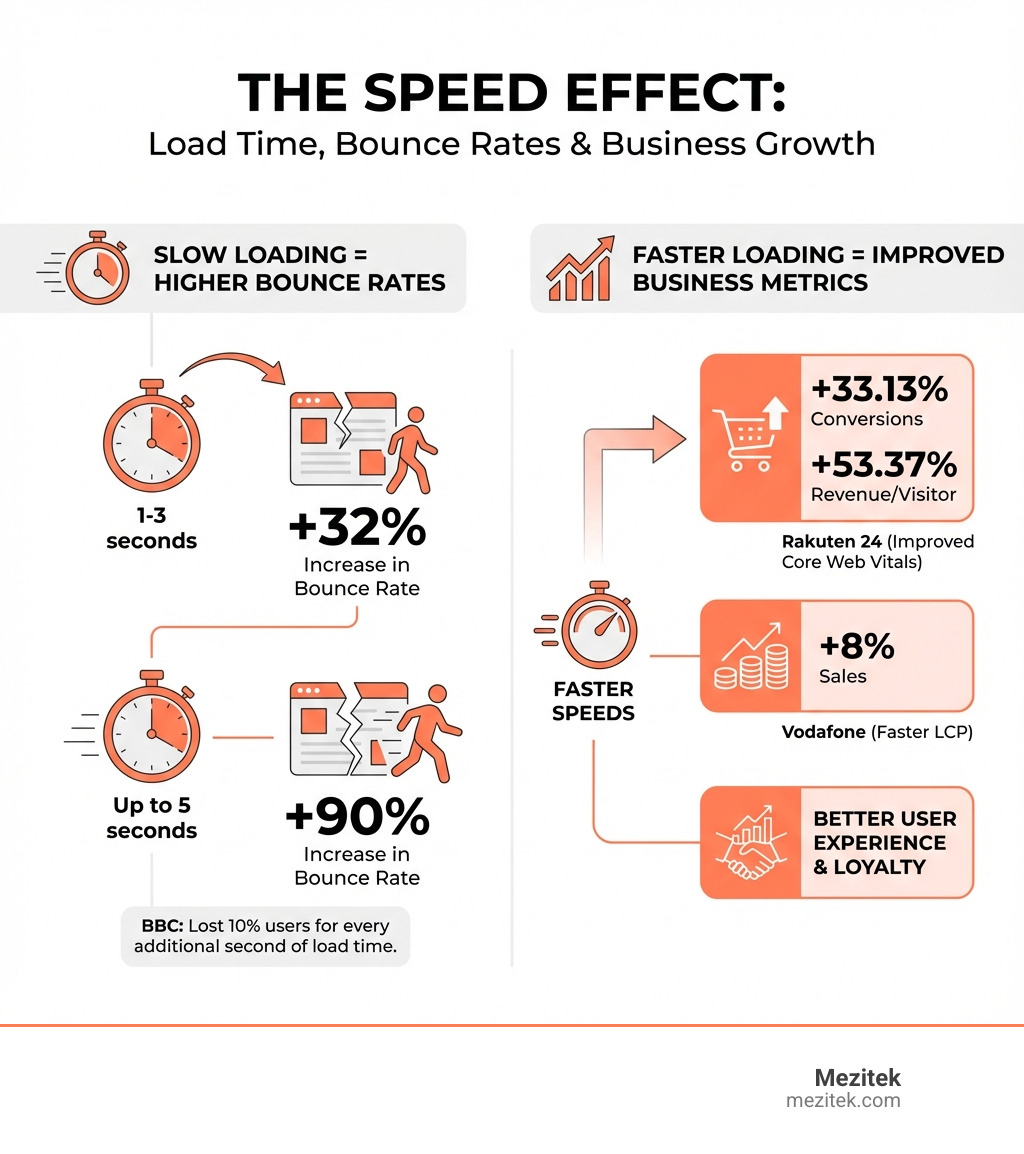
Here’s the reality: when your page takes just three seconds to load instead of one, your bounce rate jumps by 32%. Let it creep to five seconds? That’s a 90% increase in people abandoning your site. The BBC learned this the hard way—they lost 10% of users for every additional second their site took to load.
But it’s not just about losing visitors. Companies that invested in speed saw real money come back. Rakuten 24 improved their Core Web Vitals and watched their revenue per visitor increase by 53.37% and conversions climb by 33.13%. Vodafone shaved time off their Largest Contentful Paint and sales went up 8%.
The stress your visitors feel waiting for a slow page? Research shows it’s comparable to watching a horror movie or solving a tough math problem. Worse than standing in a checkout line at the store.
For freelancers and small agencies, this is your competitive edge. You don’t need a massive dev team or enterprise budget. You need to understand what slows sites down and how to fix it—quickly and effectively.
Relevant articles related to Faster website loading:
First, Let’s Get Your Score: Measuring Website Performance
Before we can make anything faster, we need to know where we stand. Think of it like getting a check-up before starting a new fitness routine. We need to measure our website’s current performance to identify the bottlenecks.

When we talk about measuring website performance, we often encounter two types of data: lab data and field data. Lab data is collected in a controlled environment, using simulated conditions (like a specific device, network speed, and location). Tools like Google Lighthouse provide lab data, giving us a consistent baseline for debugging and identifying issues. Field data, on the other hand, comes from real user experiences (RUM – Real User Monitoring), reflecting how your site performs for actual visitors under various real-world conditions. This is where metrics from the Chrome User Experience Report (CrUX) come in. Both are valuable: lab data helps us pinpoint technical issues, while field data confirms the real-world impact on our users.
Understanding Core Web Vitals
Google has emphasized a set of user-centric metrics called Core Web Vitals as crucial indicators of a positive user experience. These aren’t just arbitrary numbers; they directly reflect how users perceive your site’s speed, responsiveness, and visual stability. Google even uses them as a ranking factor, so paying attention to them is key for SEO. You can learn more about these crucial metrics and overall web performance from Google’s comprehensive resources at Learn about Web Performance.
Let’s break down the main three:
- Largest Contentful Paint (LCP): This measures loading performance. It reports the render time of the largest image or text block visible within the viewport. Essentially, it tells us how quickly your main content appears on screen. A good LCP score is under 2.5 seconds. If your LCP is slow, users are literally waiting to see your site’s primary message or visual.
- Interaction to Next Paint (INP): This metric assesses interactivity. It measures the time from when a user first interacts with a page (e.g., clicks a button, taps a link) to when the browser paints the next frame, showing the visual feedback of that interaction. A low INP (under 200 milliseconds) means your site feels snappy and responsive to user actions.
- Cumulative Layout Shift (CLS): This measures visual stability. Have you ever tried to click a button, only for the page content to suddenly shift, making you click something else entirely? That’s a layout shift. CLS quantifies the unexpected shifts of visual page content. A low CLS score (under 0.1) means your page elements stay put, offering a smooth and predictable experience.
Google prioritizes these metrics because they directly correlate with a user’s frustration or satisfaction. A site that loads quickly, responds instantly, and doesn’t jump around is a site users will love and return to.
Top Tools for a Quick Diagnosis
Now that we know what to measure, let’s look at how. There are fantastic free tools available to help us diagnose our website’s speed issues:
- Google PageSpeed Insights: This is our go-to starting point. Simply enter your URL at Google PageSpeed Insights and click “Analyze.” It provides both lab data (powered by Lighthouse) and field data (from CrUX), giving you a score from 0-100 and, crucially, a list of actionable recommendations for both desktop and mobile.
- Google Lighthouse: Built right into Chrome’s developer tools (accessible via your browser’s DevTools suite), Lighthouse runs a series of audits for performance, accessibility, SEO, and more. It offers detailed reports and specific suggestions for improvement.
- WebPageTest.org: This tool offers more granular control, allowing us to test our page from various geographical locations and on different devices and network speeds. It provides a waterfall chart showing every request made by our page, helping us identify exactly what’s slowing things down.
- Pingdom: Another popular speed testing tool that offers a user-friendly interface and detailed breakdowns of load times, file sizes, and requests. It’s great for visualizing the sequence of asset loading.
When interpreting results, don’t just chase a perfect score. Instead, focus on the recommendations that offer the biggest impact for your specific site. Look for red flags like large images, render-blocking scripts, or slow server response times. These are our actionable insights.
The Core Optimizations for Faster Website Loading
Alright, we’ve got our diagnostics. Now it’s time to roll up our sleeves and get to work. For us low-code freelancers and small business owners, the good news is that many of the most impactful optimizations don’t require deep coding knowledge. They’re about smart choices and leveraging the right tools.

These actionable tips are designed to be low-code friendly and prioritize solutions that offer the biggest “bang for your buck.” We’ll focus on the fundamental pillars of website speed: your hosting, your images, your code, and how you deliver content.
Optimize Your Foundation: Hosting and CDNs
Think of your website’s hosting as its home. A fast, reliable home makes everything else run smoothly. If your server is slow, even the most perfectly optimized website will feel sluggish.
Hosting’s role in performance is paramount. It determines how quickly your server responds to a user’s request. This is measured by Time to First Byte (TTFB), which is the time it takes for a browser to receive the first byte of response from your server. We want our TTFB to be under 200 milliseconds. Anything higher indicates a potential server-side issue.
When choosing a hosting solution, it’s tempting to go for the cheapest option. But as we often say, you get what you pay for. Mediocre hosting isn’t worth the cost savings in the long run because it directly impacts performance and, consequently, your business. We’ve put together a comprehensive guide on How to Choose a Host for Your Website and a broader overview of Mezitek’s Guide to Hosting Solutions to help you make an informed decision. Look for providers with good uptime, fast SSD storage, and server locations close to your target audience.
Beyond your primary host, Content Delivery Networks (CDNs) are a game-changer for faster website loading. A CDN is a geographically distributed network of proxy servers and their data centers. When a user requests content from your site, the CDN delivers it from the server closest to them. This dramatically reduces latency because the data has less distance to travel. Imagine your website’s content being available in dozens of locations worldwide; that’s the power of a CDN. It’s particularly effective for static assets like images, CSS, and JavaScript.
How Image Optimization Leads to Faster Website Loading
If there’s one area where we can almost always find significant speed improvements, it’s images. Images are often the heaviest elements on a page, and unoptimized ones can drag your site’s performance down like an anchor.
Here’s how we tackle image optimization:
- Compressing images: This is non-negotiable. We want to reduce the file size without noticeably compromising quality. There are two main types:
- Lossless compression: Reduces file size by removing metadata without discarding any image data. The image quality remains perfect.
- Lossy compression: Achieves greater file size reduction by permanently removing some image data. This can result in a slight quality degradation, but it’s often imperceptible to the human eye, especially for web use. Tools like TinyPNG, ImageOptim, or even built-in features in many CMS platforms can handle this for us.
- Choosing the right format:
- JPEG (.jpg): Best for photographs and images with many colors.
- PNG (.png): Ideal for images with transparency or sharp edges, like logos or graphics.
- WebP (.webp): This is the modern hero. WebP offers superior lossless and lossy compression for images, resulting in smaller file sizes than JPEG or PNG, often by 25-35%, with comparable quality. Most modern browsers support WebP, so it’s a fantastic choice for faster website loading.
- Serving responsive images: Our websites are viewed on a myriad of devices, from tiny phone screens to massive desktop monitors. We shouldn’t serve a huge desktop image to a mobile user. Use
srcsetandsizesattributes in your<img>tags (or leverage image CDNs) to deliver appropriately sized images based on the user’s device and screen resolution. - Lazy loading for off-screen images: Why load an image that’s far down the page and not yet visible to the user? Lazy loading defers the loading of these images until they are about to enter the viewport. This significantly speeds up initial page load times. Most modern browsers support native lazy loading (
loading="lazy"attribute), and many CMS plugins offer this functionality. Just be sure to implement an SEO fallback to ensure search engines can still find your images. - Replacing animated GIFs with video: Animated GIFs are notoriously inefficient. They are essentially a sequence of images, resulting in huge file sizes. For animations, we should always opt for video formats like MP4 or WebM. They offer much better compression and smaller file sizes for comparable visual quality, leading to much faster website loading.
Streamline Your Code: Minification and Asynchronous Loading
Our website’s code—CSS, JavaScript, and HTML—is the blueprint and the engine. Just like a finely tuned car engine, efficient code makes for a faster ride.
Minification is the process of removing all unnecessary characters from our code without changing its functionality. This includes whitespace, comments, line breaks, and sometimes even shortening variable names. While these elements are helpful for us developers, they’re just extra bytes for the browser to download and parse. Minifying CSS, JavaScript, and HTML can shave off significant file size, leading to faster website loading. Many build tools, plugins, and even some hosting providers offer automatic minification.
Beyond minification, we need to think about how our code loads. By default, browsers are “render-blocking” when they encounter certain resources. This means they’ll pause rendering the page until that resource is fully downloaded and processed. This is particularly true for CSS linked with traditional link tags and JavaScript placed in the <head>.
Asynchronous loading helps us bypass this bottleneck. For JavaScript, we can use the async or defer attributes on our <script> tags:
async: Tells the browser to download the script in the background and execute it as soon as it’s ready, without blocking HTML parsing. The order of execution isn’t guaranteed.defer: Also downloads the script in the background but executes it only after the HTML document has been completely parsed, and in the order they appear in the HTML. This is often ideal for scripts that depend on the DOM being fully loaded.
For CSS, we can implement strategies like loading non-critical CSS asynchronously (e.g., by initially setting the media attribute to print and then changing it to all with JavaScript) or by inlining critical CSS. Inlining critical CSS means embedding the minimal CSS required for the “above-the-fold” content directly into the <head> of our HTML. This ensures the immediately visible part of the page styles quickly without an extra request. You can dive deeper into these technical best practices on Web Performance best practices & tips.
Finally, don’t forget optimizing web fonts. Custom web fonts can add significant load time.
- Use modern font formats like WOFF and WOFF2, which are compressed by default.
- Implement
font-display: swapin your@font-facedeclarations. This tells the browser to use a system font as a fallback while your custom font loads, preventing a “flash of invisible text” (FOIT) and improving perceived performance. - Avoid icon web fonts. While convenient, they often load an entire font file for a few icons. Instead, use SVG icons. They are vector-based, highly scalable, and can be inlined directly into your HTML, making them much more efficient.
The Role of Caching and Third-Party Scripts
Caching is like having a super-efficient assistant who remembers everything. It stores copies of your website’s files so they don’t have to be fetched from the server every single time a user visits.
Browser caching instructs a user’s browser to store static assets (like images, CSS, and JavaScript files) for a specified period. When the user revisits your site, their browser can load these assets from their local cache instead of making new requests to your server. This significantly speeds up subsequent page loads. We configure this using Cache-Control headers on our server.
Web page caching (or server-side caching) works on the server level. This could involve full-page caching (saving a complete HTML page), object caching (saving database query results), or opcode caching. For those of us using CMS platforms like WordPress, caching plugins can handle this automatically, generating static HTML versions of our dynamic pages. This means the server doesn’t have to process PHP and database queries for every request, drastically reducing response times and enabling faster website loading.
Both types of caching contribute to serving repeat visitors faster, reducing server load, and improving overall performance. It’s a win-win.
However, even with stellar caching, our sites can be slowed down by plugins and external scripts. While plugins add functionality and external scripts (like analytics, social media widgets, ad networks, or live chat) offer valuable services, each one adds code, HTTP requests, and potential processing overhead. Poorly coded plugins or too many external scripts can negate all our other optimization efforts.
We need to be vigilant about auditing third-party resources.
- Evaluate necessity: Do we truly need every plugin or external script? Remove any that aren’t essential or are rarely used.
- Identify slow scripts: Use our speed testing tools to see which external resources are taking the longest to load.
- Defer loading: Can we load non-critical scripts after the main content has rendered? Many scripts can be loaded asynchronously or deferred to improve initial page load.
- Consider alternatives: For some functionalities, a lightweight, custom solution might be better than a heavy plugin.
Third-party scripts, especially those that track user behavior, also have implications for privacy and cookie consent. Our Cookie Consent Guide for Web Designers can help you steer this aspect effectively.
Building a Performance-First Mindset for Your Business
Optimizing for speed isn’t just a technical task; it’s a strategic business decision. For us, building a performance-first mindset means understanding that every millisecond counts towards user satisfaction and, ultimately, our bottom line.
The business case for speed is overwhelmingly clear. As the research shows, slow websites frustrate users, drive them away, and directly impact revenue. Conversely, fast websites engage visitors, encourage longer sessions, and boost conversions. Google’s own web.dev platform has a great resource on Why speed matters for business, reinforcing this point.
Connecting performance to revenue isn’t abstract. When we see Rakuten 24 increase revenue per visitor by over 50% or Vodafone boost sales by 8% just by improving their site speed, we understand the direct correlation. This isn’t just about technical scores; it’s about making more money for our businesses and our clients.
To truly embed speed into our workflow, we need to foster a performance culture. This means making performance a consideration from the very beginning of a project—from design choices to choosing technologies and hosting solutions. It’s an ongoing commitment, not a one-time fix.
Finally, consider setting performance budgets. This involves defining measurable limits for various aspects of your page, like total page weight, JavaScript size, image size, or font count. For example, you might set a budget that your total page weight must not exceed 1MB, or your JavaScript bundle must be under 300KB. Tools like Lighthouse CI can help monitor these budgets and alert you if you exceed them, preventing performance regressions.
The Business Case for a Fast Website
Let’s reiterate why investing in a fast website is one of the smartest business decisions you can make. The statistics don’t lie, and the impact is profound.
We’ve seen that even a slight delay in loading times can dramatically increase bounce rates. That’s potential customers leaving before they even see what you offer. But the positive flip side is even more compelling:
- Increased Sales and Conversions: Rakuten 24’s 53.37% increase in revenue per visitor and 33.13% increase in conversion rate, and Vodafone’s 8% sales boost due to LCP improvements, are powerful examples. RedBus, a travel booking site, increased sales by 7% just by improving their Interaction to Next Paint (INP). These aren’t isolated incidents; they represent a clear trend. A faster site means more completed purchases, more leads, and ultimately, more money in the bank. We even discuss this in our guide on how to Increase Landing Page Conversion Rate.
- Reduced User Stress: Research shows the stress response to delays in page speed is akin to watching a horror movie. We don’t want our visitors to experience that. A fast site creates a calm, efficient, and enjoyable experience, which directly translates to positive brand association.
- Improved Long-Term Brand Perception: A consistently fast and responsive website signals professionalism, reliability, and attention to detail. It builds trust and encourages repeat visits, turning one-time visitors into loyal customers. In today’s competitive digital landscape, speed is a differentiator.
Why Mobile Speed is Non-Negotiable
If you’re not prioritizing mobile speed, you’re missing out on a massive audience. The world is increasingly mobile-first, and Google knows it.
- Mobile-First Indexing: Google primarily uses the mobile version of your content for indexing and ranking. If your mobile site is slow, it directly impacts your visibility in search results.
- Different Network Conditions: Mobile users often browse on variable network conditions—from fast Wi-Fi to patchy 3G. A heavy, unoptimized site will perform even worse on slower connections, leading to extreme frustration.
- CPU Limitations on Mobile Devices: Mobile phones generally have less processing power and memory than desktop computers. Complex, unoptimized scripts and animations that might run fine on a powerful desktop can easily bog down a mobile device, making the user experience sluggish and unresponsive.
- Importance of a Responsive Design: While responsive design ensures your site adapts to different screen sizes, true mobile optimization goes beyond just layout. It means ensuring that only necessary resources are loaded for mobile, and that interactions are smooth.
- Progressive Web Apps (PWAs): For the ultimate mobile experience, consider Progressive Web Apps. PWAs are web applications that offer a native app-like experience, including offline capabilities, push notifications, and, critically, blazing fast loading times, even on slow networks. They represent the pinnacle of mobile web performance.
Frequently Asked Questions about Website Speed
We get a lot of questions about website speed. Here are some of the most common ones we hear from freelancers and small business owners:
What is the single most effective way to speed up a website?
For most content-heavy sites, especially those built with low-code tools or CMS platforms, the most effective first step is image optimization. Images are typically the largest contributors to page weight. Compressing files, choosing modern formats like WebP, and implementing lazy loading provides the biggest “bang for your buck” with minimal technical knowledge. It’s often the quickest and most significant win.
How much does my hosting plan really affect my site speed?
Hosting is the absolute foundation of your site’s speed. A slow or overloaded server will result in a poor Time to First Byte (TTFB), meaning that even a perfectly optimized site will feel sluggish because the initial response from the server is delayed. Think of it like a beautiful, high-performance car stuck in traffic—no matter how fast it is, it can’t move. Investing in quality hosting from a reputable provider is crucial. It ensures your site has the resources it needs to respond quickly to user requests. We explore this further in our articles, including More on hosting options.
Can too many plugins on my site slow it down?
Yes, absolutely! This is a very common culprit for slow websites, especially on platforms like WordPress. Each plugin adds its own code (CSS, JavaScript), potentially makes additional database queries, and introduces more HTTP requests that need to be processed and downloaded. Poorly coded or unnecessary plugins can significantly increase your page weight and execution time. Our advice: regularly audit your plugins, remove any you don’t actively use, and always choose lightweight, well-optimized alternatives when possible. When in doubt, less is often more.
Conclusion: Stop Losing Visitors to a Slow Website
We’ve covered a lot today, from understanding why every second counts to the nitty-gritty of code optimization and the strategic importance of a performance-first mindset. The key takeaway is clear: Faster website loading is not just a technical detail; it’s a critical component of user experience, SEO, and ultimately, your business success.
Speed is an ongoing process, not a one-time fix. The web is constantly evolving, and so should our optimization efforts. Regularly monitor your Core Web Vitals, audit your resources, and stay updated on best practices.
For us freelancers and small business owners, embracing these optimization strategies empowers us to deliver exceptional value to our clients and build robust, high-performing digital presences for ourselves. It’s about working smarter, not harder, and choosing solutions that inherently support speed.
The benefits of a lightweight, fast platform are undeniable. They offer better user experiences, higher conversion rates, and a stronger competitive edge. If you’re struggling with a bloated or slow platform, or simply looking for a more efficient foundation, we encourage you to explore alternatives. For a truly fast foundation, consider exploring Best WordPress Alternatives. Let’s make the web a faster, happier place for everyone!