
What Are Progressive Web Apps and Why Should You Care?
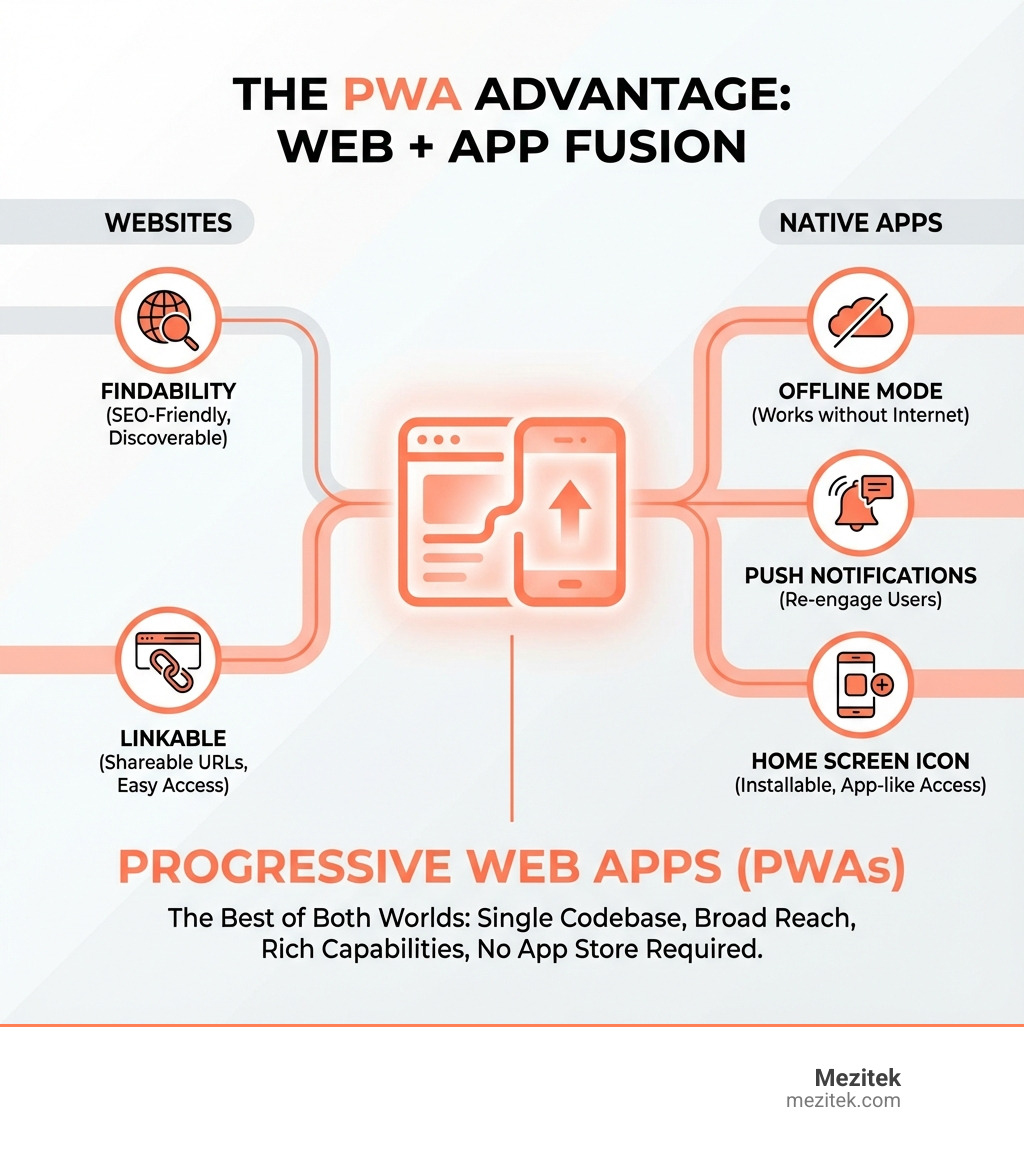
Progressive Web Apps (PWAs) are web applications built with standard web technologies that can be installed on any device and deliver app-like experiences—without requiring users to visit an app store. They combine the broad reach and findability of traditional websites with the rich capabilities of platform-specific apps, all from a single codebase.
What PWAs Offer:
- Installable – Add to home screen like a native app
- Offline-capable – Work without internet connection
- Fast loading – Even on slow networks
- Push notifications – Re-engage users directly
- Cost-effective – One codebase for all platforms
- SEO-friendly – Findable by search engines
- No app store required – Install directly from the web
If you’re a freelancer or agency building websites for clients, PWAs represent a massive opportunity. They solve a real problem: how do you deliver an app-like experience without the cost and complexity of building separate iOS and Android apps?
The numbers tell a compelling story. Companies switching to PWAs have seen engagement increase by 137%, mobile sessions jump by 80%, and bounce rates drop by up to 42.86%. Twitter Lite’s PWA uses less than 5% of the storage space of their native Android app while experiencing a 75% increase in tweet volume. Pinterest saw users spend 40% more time on their PWA compared to their mobile website.
For your clients—whether they’re running an e-commerce store, a local service business, or a content platform—PWAs bridge the gap between wanting an app and being able to afford one. They’re particularly powerful in a mobile-first world where 59% of all web traffic comes from mobile devices, yet many small businesses can’t justify the $50,000+ investment for native app development.
The beauty of PWAs? They work progressively. Users can interact with them as a normal website, then choose to install them for a fuller experience. No forced downloads. No app store approval processes. No platform-specific development teams.
What Makes a Web App ‘Progressive’? The Core Pillars
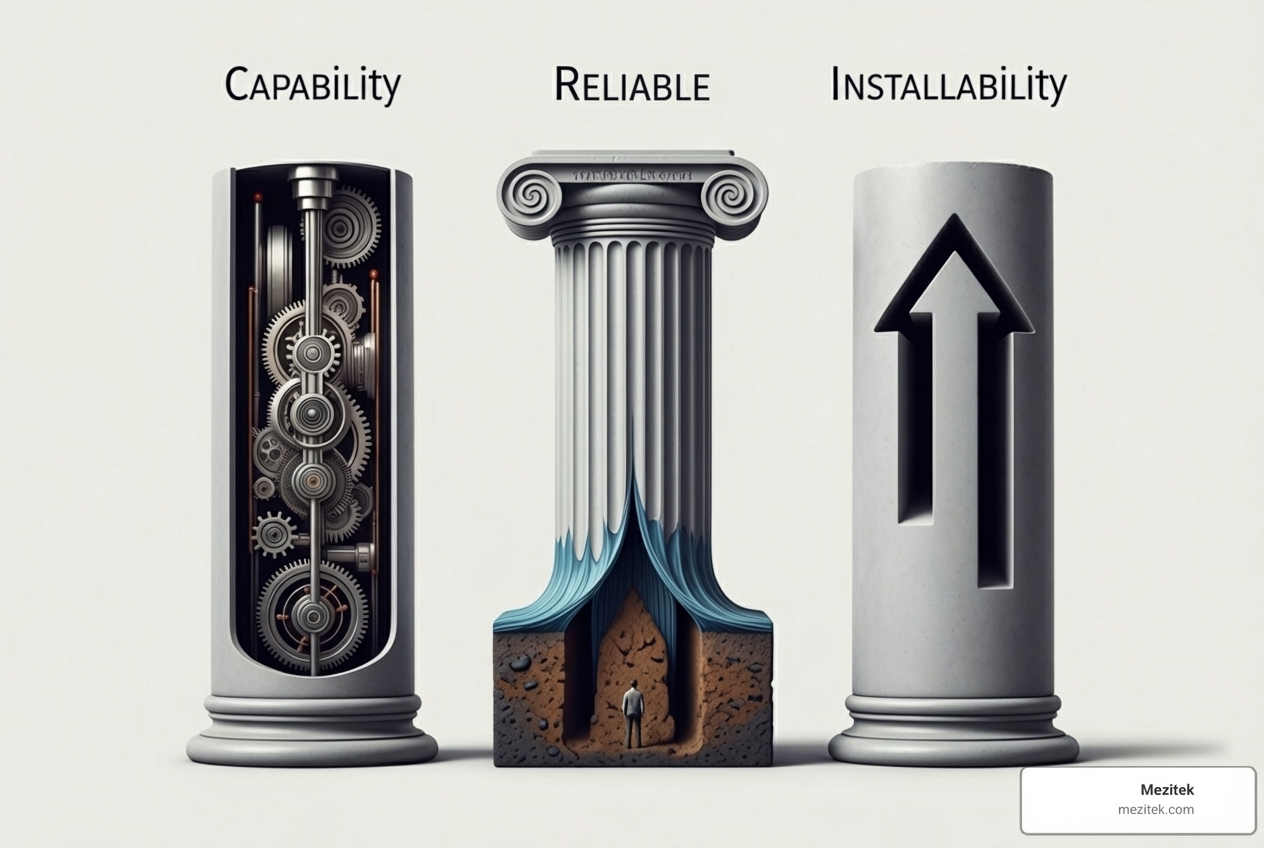
So, what exactly gives a website these superpowers? It all comes down to three core pillars that define a Progressive Web App: Capable, Reliable, and Installable. Think of it as the secret sauce that transforms a good website into an amazing, app-like experience. For us, as freelancers and small business owners, understanding these pillars is key to open uping the full potential of PWAs for our clients.
Capable: More Than Just a Website
A traditional website lives inside a browser tab, playing by its rules. But Progressive Web Apps break free, gaining capabilities once reserved for native applications. This is thanks to modern web APIs (Application Programming Interfaces) that allow PWAs to interact more deeply with a user’s device.
Imagine a website that can:
- Send push notifications: Just like your favorite messaging app, a PWA can re-engage users with timely updates, special offers, or important alerts, even when they’re not actively using the app.
- Access hardware: While not full access, PWAs can tap into features like geolocation for location-based services, the camera for scanning QR codes, or even the clipboard for easy copy-pasting. Advanced APIs like WebBluetooth and WebUSB are expanding these horizons even further.
- Process payments: Streamlined web payment APIs mean faster, more secure checkout experiences, reducing friction for your customers.
- Share data: PWAs can integrate with the operating system’s sharing mechanism, allowing users to easily share content from your PWA to other apps on their device.
- Display badges: A small number on the app icon can notify users of new messages or updates, much like a native app.
These improved functionalities mean we can build truly Innovative Web Solutions that feel intuitive and powerful, without the heavy development overhead of native apps.
Reliable: Fast and Always Available
Nobody likes waiting. Studies show that if a page takes more than 3 seconds to load, the probability of a user bouncing increases by a whopping 123%! This is where the “Reliable” pillar shines. Progressive Web Apps are designed to be consistently fast and dependable, regardless of network conditions.
The magic behind this reliability is primarily the Service Worker. This clever piece of JavaScript acts like a proxy between your PWA and the network, allowing it to:
- Cache resources: The service worker can store important parts of your website (like HTML, CSS, JavaScript, and images) directly on the user’s device. This means subsequent visits load almost instantly, even on flaky connections.
- Enable offline functionality: With cached resources, your PWA can provide a basic, functional experience even when there’s no internet connection. Think of Starbucks’ PWA, where customers can browse menus and add items to their cart offline, completing the order once service is restored. This is a game-changer for user experience.
- Perform background operations: Service workers can handle tasks in the background, like updating content or syncing data, even when the user isn’t actively in the app.
This intelligent caching and background processing ensure a smooth, app-like experience that reduces bounce rates and builds user trust. To dive deeper into this fascinating technology, check out our guide to the Introduction to Service Worker.
Installable: Living on the Home Screen
The final pillar is what truly makes a Progressive Web App feel like a native app: its installability. Instead of living in a browser tab, a PWA can be added directly to a user’s home screen, dock, or taskbar, just like any other application.
How does this happen? Through the Web App Manifest. This is a simple JSON file that provides information about your PWA to the browser, including:
- Its name and short name
- Icons for different screen sizes
- The start URL
- The display mode (e.g., standalone, fullscreen, minimal-ui)
- Theme and background colors
When a user visits your PWA and it meets certain criteria (like being served over HTTPS and having a service worker), the browser can prompt them to “Add to Home Screen.” Once installed, the PWA launches in its own standalone window, without browser UI elements like address bars, making it feel completely integrated with the operating system.
This seamless installation process removes friction, increases engagement, and makes your client’s brand a permanent fixture on their users’ devices. It’s a key aspect of building a robust Best Practices for Website Architecture for the modern web.
The Game-Changing Benefits of Progressive Web Apps
Now that we understand the “how,” let’s talk about the “why.” For small business owners and the freelancers who build for them, the benefits of embracing Progressive Web Apps are incredibly compelling, touching every aspect from development costs to user engagement and conversions.
Why Choose Progressive Web Apps for Your Business?
PWAs aren’t just a tech trend; they’re a strategic business advantage. Here’s why they’re becoming the go-to solution for forward-thinking businesses:
- Lower Development Costs & Faster Time-to-Market: This is huge for small businesses. Instead of building separate native apps for iOS and Android, a single PWA codebase works across all platforms. This drastically cuts down development time and expenses, getting your product to market faster. We’re talking significantly lower cross-platform development costs compared to native apps!
- Cross-Device Compatibility: One PWA works everywhere – desktops, laptops, tablets, and phones, regardless of operating system. This ensures a consistent brand experience across all touchpoints without needing platform-specific optimizations.
- SEO Benefits: Unlike native apps hidden in app stores, PWAs are websites at their core. This means they are findable and indexable by search engines like Google, boosting your organic reach and making it easier for new users to find you.
- Increased Engagement & Conversion Rates: The statistics speak for themselves. Companies adopting PWAs have seen:
- Overall engagement boosted by 137%.
- Mobile sessions on a site increased by 80%.
- Bounce rates decreased by up to 42.86%.
- Page views increased by approximately 134%.
- Trivago experienced a 150% increase in engagement for users who added its PWA to their home screen, leading to a 97% increase in conversions to hotel offers.
- Always Up-to-Date: Since PWAs are web-based, updates are deployed instantly. No more waiting for app store approvals or users to manually update their apps. Everyone is always on the latest version.
These tangible benefits make Progressive Web Apps a powerful tool for any business looking to expand its digital footprint efficiently and effectively.
What’s In It For Your Users?
While the business benefits are clear, the real magic of PWAs lies in the improved experience they offer to users. After all, happy users lead to happy clients!

- No Installation Friction: Ever hesitated to download a new app because you weren’t sure you’d use it enough to justify the space? PWAs eliminate this. Users can simply visit a website, and if they like it, install it with a single tap, bypassing the app store entirely. It’s like test-driving a car without having to buy it first!
- Less Storage Space: Native apps can be massive. Twitter Lite’s PWA, for instance, uses less than 5% of the storage space of its native Android app. Tinder’s PWA is 90% smaller than its compiled Android app, cutting load times from 11.9 seconds to just 4.6 seconds. This is a huge win for users with older devices or limited storage.
- App-like UX/UI: Once installed, a PWA looks and feels like a native app. It launches from the home screen, occupies its own window (without browser chrome), and provides a smooth, engaging user interface.
- Works on Slow Networks & Offline: Thanks to service workers, PWAs are resilient. Uber’s PWA, for example, is designed to work efficiently even on 2G connections, taking only 3 seconds to load. And for those moments when there’s no service at all, like Starbucks users browsing menus, the offline capabilities keep the experience going.
- Always Up-to-Date: Users always get the latest features and bug fixes without manual updates, ensuring a consistent and high-quality experience.
PWA vs. Traditional Web App: Making the Right Choice
As freelancers and small business owners, we’re constantly evaluating the best tools and approaches for our projects. When it comes to digital presence, the choice between a traditional website and a Progressive Web App isn’t always straightforward. Let’s break down the key differences to help you make an informed decision for your clients.
Key Differences at a Glance
Here’s a quick comparison to highlight where PWAs shine and how they differ from their traditional web counterparts:
| Feature | Traditional Web App | Progressive Web App |
|---|---|---|
| Development Cost | Moderate (single codebase) | Lower (single codebase, no separate native apps) |
| Platform Independence | High (browser-dependent) | High (browser-dependent, but with OS integration) |
| Findability (SEO) | High (indexed by search engines) | High (indexed by search engines, plus app store visibility for some) |
| Performance | Network-dependent, can be slow | Fast, often instant loading (cached), resilient to network issues |
| Offline Access | No (requires network connection) | Yes (via Service Workers, offers basic functionality) |
| Hardware Access | Limited (e.g., camera, geolocation with permission) | Moderate (e.g., camera, geolocation, push notifications, some advanced APIs) |
| Installation | No (accessed via browser URL) | Yes (add to home screen, launches as standalone app, optional app store listing) |
Understanding the Trade-offs: When is a PWA Not the Best Fit?
While Progressive Web Apps offer a fantastic blend of web and native capabilities, they aren’t a one-size-fits-all solution. There are specific scenarios where a full native app might still be the better choice:
- Deeper Hardware Integration: If your client’s application absolutely requires deep integration with specific device hardware that isn’t yet exposed through web APIs (like complex background tasks, highly specialized sensors, or direct access to the file system for manipulation), a native app might be necessary. While PWAs are constantly evolving and gaining more access, some capabilities are still out of the web’s reach.
- Advanced Device Features: Applications that rely heavily on very specific, low-level operating system features or proprietary APIs (e.g., certain AR/VR functionalities that go beyond WebXR, or highly complex graphics rendering that needs native GPU access) might perform better as native apps.
- When a More Specialized Solution is Necessary: For highly complex games, intensive video editing suites, or applications that require consistent, uninterrupted background processing with minimal battery drain, native apps often still hold an edge. In these cases, the performance and optimization benefits of native code outweigh the PWA’s advantages in reach and development cost.
It’s crucial to understand these limitations and have an honest conversation with your clients. Sometimes, the added complexity of a native app is justified by its unique requirements. However, for the vast majority of business websites and online services, PWAs provide an incredibly powerful and cost-effective solution.
PWA Success Stories: See the Revolution in Action
The theory is great, but nothing proves the power of Progressive Web Apps like real-world success. Businesses across various industries are leveraging PWAs to boost engagement, increase conversions, and provide superior user experiences. Let’s look at some inspiring examples.
Food & Beverage: Boosting Orders with PWAs
The food and beverage industry thrives on convenience and accessibility. PWAs are serving up significant wins here:
- Starbucks: Their PWA is a prime example of offline functionality. Customers can browse the menu and add items to their carts even without an internet connection. Once service is restored, they can complete their orders seamlessly. This led to Starbucks doubling their daily active users and seeing desktop orders nearly match mobile rates.
- Yummly: This popular cooking platform uses its PWA to re-engage users with push notifications and provides a smooth, app-like user experience that significantly improves customer satisfaction.
Social & Communication: Engaging Users on Any Network
For platforms built on user interaction, PWAs offer a lightweight, fast, and highly engaging experience:
- Twitter Lite: This PWA is a masterclass in efficiency. It requires less than 5% of the storage space of the standard Twitter for Android app. The result? A 75% increase in tweet volume, a 65% rise in pages per session, and a 20% drop in bounce rate.
- Pinterest: Recognizing that their mobile website converted only 1% of users, Pinterest rebuilt with PWA technology. This led to users spending 40% more time on the PWA compared to the mobile website, a 60% rise in core user engagement, and a 44% higher ad revenue. And it only requires 150 KB of data!
- Telegram PWA: This communication app saw a massive 175% increase in users, 50% greater retention rates, and 50% more sessions per user thanks to its fast, secure, and offline-capable PWA.
- Tinder: The dating app’s PWA decreased load times from 11.9 seconds to a snappy 4.6 seconds. Users even started sending more messages and editing their profiles more often on the web version than on their native apps!
Travel & Booking: Higher Conversions with Seamless Experiences
In an industry where speed and reliability are paramount, PWAs are helping users plan and book with ease:
- Trivago: This hotel search engine experienced a 150% increase in engagement and conversions skyrocketing by 97%. Over 500,000 users added the PWA to their home screens, and they returned at least twice in the 14 days after installation. This means happy travelers and more bookings!
- MakeMyTrip: India’s leading online travel agency saw a 3x increase in conversion rate, a 38% reduction in page load time, and 160% more shopping sessions after launching their PWA.
- Uber: Uber’s PWA is designed for global accessibility, especially in regions with slower networks. It boasts an improved Time To First Byte (TTFB) from 1.5 seconds to 1.26 seconds and loads in just 3 seconds, even on a 2G connection.
- Housing.com: This real estate service in India achieved a 38% increase in conversions, a 40% lower bounce rate, and a 10% longer average session with its PWA, proving that offline capabilities and fast loading are crucial for finding a new home.
These examples clearly demonstrate that Progressive Web Apps are not just a technology; they are a proven strategy for business growth and user satisfaction.
Your Roadmap to Launching a PWA
Feeling inspired? Building a Progressive Web App might sound complex, but with the right guidance, it’s entirely achievable for freelancers and small business owners. We’ll give you a simplified roadmap to help you understand the core requirements.
Key Technical Criteria for Progressive Web Apps
To earn the “Progressive Web App” badge and deliver that app-like experience, your website needs to meet a few essential technical criteria:
- HTTPS Security: This is non-negotiable. Your entire site must be served over HTTPS. This ensures user privacy, data integrity, and authenticates your website, which is fundamental for many advanced web features and PWA capabilities. Think of it as the secure foundation for your app.
- Service Worker Registration: We’ve talked about these unsung heroes! Your PWA needs a Service Worker registered to handle caching, enable offline capabilities, and manage background tasks. This JavaScript file runs in the background, separate from your main web page, making your PWA reliable and fast.
- A Valid Web App Manifest File: This JSON file is crucial for installability. It tells the browser and operating system how your PWA should appear and behave when installed. Key properties include:
nameandshort_name: What appears on the home screen.start_url: Where the PWA launches.display: How it looks (e.g.,standalonefor an app-like window).icons: Different sizes of your app icon.
- Responsive Design: While not strictly a PWA-specific technical component, a Progressive Web App must be responsive. It needs to look and function beautifully across all screen sizes and devices, from the smallest smartphone to the largest desktop monitor. This ensures a consistent and enjoyable user experience, regardless of how your clients’ customers access the PWA.
Meeting these criteria transforms a regular website into a powerful Progressive Web App. If you’re wondering how to lay the groundwork for such a robust online presence, our guide on How to Build a Website can get you started.
Browser Support and Distribution
One of the great strengths of Progressive Web Apps is their broad reach. They leverage standard web technologies, meaning they work across virtually all modern browsers and devices. However, the level of “app-like” functionality can vary:
- Chrome and Edge Leadership: Browsers based on the Chromium engine (like Google Chrome and Microsoft Edge) have historically been at the forefront of PWA development and support. They offer the most comprehensive set of PWA features, including robust installation prompts, extensive API access, and deep operating system integration.
- Improving Safari Support: Apple’s Safari browser on iOS and iPadOS has traditionally had more limited PWA support compared to its Chromium counterparts. However, support has significantly improved over time, with features like “Add to Home Screen” and certain web APIs becoming more robust. While some advanced features might still be missing, the core PWA experience is generally well-supported.
- Firefox and Other Browsers: Firefox for Android supports PWAs quite well, although Firefox for desktop historically deprecated PWA support before re-evaluating. Other browsers like Brave and Vivaldi also offer PWA capabilities. The good news is that as of 2025, PWA features are supported to varying degrees across most major browsers.
- Listing on Supported Platforms: While a key advantage of PWAs is direct web installation, they can also be listed in app stores. The Microsoft Store actively supports PWAs, allowing them to be finded and installed like native apps. Google Play also allows PWAs to be listed. Apple’s App Store, however, does not officially support PWAs in the same way, preferring native submissions. This means that while 88% of web users can install a PWA, your distribution strategy might differ based on the platform.
The implications for findability are significant. Your Progressive Web App benefits from web SEO, making it findable through search engines, and for some platforms, it gains additional visibility within app stores. This multi-channel findability is a powerful advantage over traditional native apps.
Conclusion: Is a PWA the Future of Your Website?
We’ve journeyed through Progressive Web Apps, from their core definitions and technical pillars to their game-changing benefits and inspiring success stories. We’ve seen how they seamlessly blend the best aspects of websites and native applications, offering a powerful, cost-effective solution for businesses of all sizes.
For us, as freelancers and small business owners, PWAs represent an unparalleled opportunity. They allow us to deliver sophisticated, app-like experiences to our clients’ customers without the prohibitive costs and complexities of developing separate native applications. This means:
- Accessibility: Reaching a wider audience on any device, regardless of network conditions or storage limitations.
- Cost-effectiveness: Building and maintaining a single codebase, saving time and money.
- Improved User Experience: Providing fast, reliable, and engaging interactions that boost conversions and customer loyalty.
Progressive Web Apps are more than just a trend; they are the next evolutionary step for the web. They empower your clients to offer a superior digital presence, stay competitive, and connect more deeply with their audience. If you’re looking to build cutting-edge, high-performing websites that truly stand out, embracing the PWA revolution is a smart move.
Ready to explore how these innovative solutions can transform your next project? Let’s take the next step in web evolution together. Explore modern WordPress alternatives for your next project and find how to build the future of the web, today.