Why Go Custom? Opening Up Your Business’s Full Potential
Custom web applications are interactive software programs that run in your web browser and help you accomplish specific tasks—like managing customer data, processing orders, or tracking projects. Unlike regular websites that just display information, these apps let you input data, make changes, and get real-time results.
Quick Answer: What makes a custom web application different?
- Interactivity: Users can input data, click buttons, and see instant results
- Data Processing: Apps capture, store, and manipulate information in real-time
- Problem-Solving: Built specifically to solve your unique business challenges
- Cloud-Based: Accessible from any device with a browser, no downloads needed
- Custom Features: Every function is designed around your specific workflow
Think about the apps you use every day. Google Docs lets you write and collaborate. Your online banking portal lets you transfer money. Netflix streams your favorite shows. These are all web applications—and your business can have its own custom-built version designed exactly for what you need.
The custom web app development market is growing fast, with experts predicting 22.5% growth through 2030. Why? Because businesses are realizing that off-the-shelf software doesn’t always fit their unique processes. Generic tools force you to adapt your business to their rules. Custom apps flip that script entirely.
For freelancers and small agency owners, understanding custom web applications opens up massive opportunities. Your clients need these solutions, whether they realize it yet or not. Every business has unique workflows, specific pain points, and particular ways they serve customers. A custom web app can automate time-consuming tasks, eliminate manual data entry, and create seamless experiences that keep customers coming back.
But here’s the thing: custom doesn’t have to mean complicated or expensive anymore. Modern development tools, visual builders, and AI-powered platforms have changed the game. You don’t need a giant development team or a six-figure budget to build something powerful.
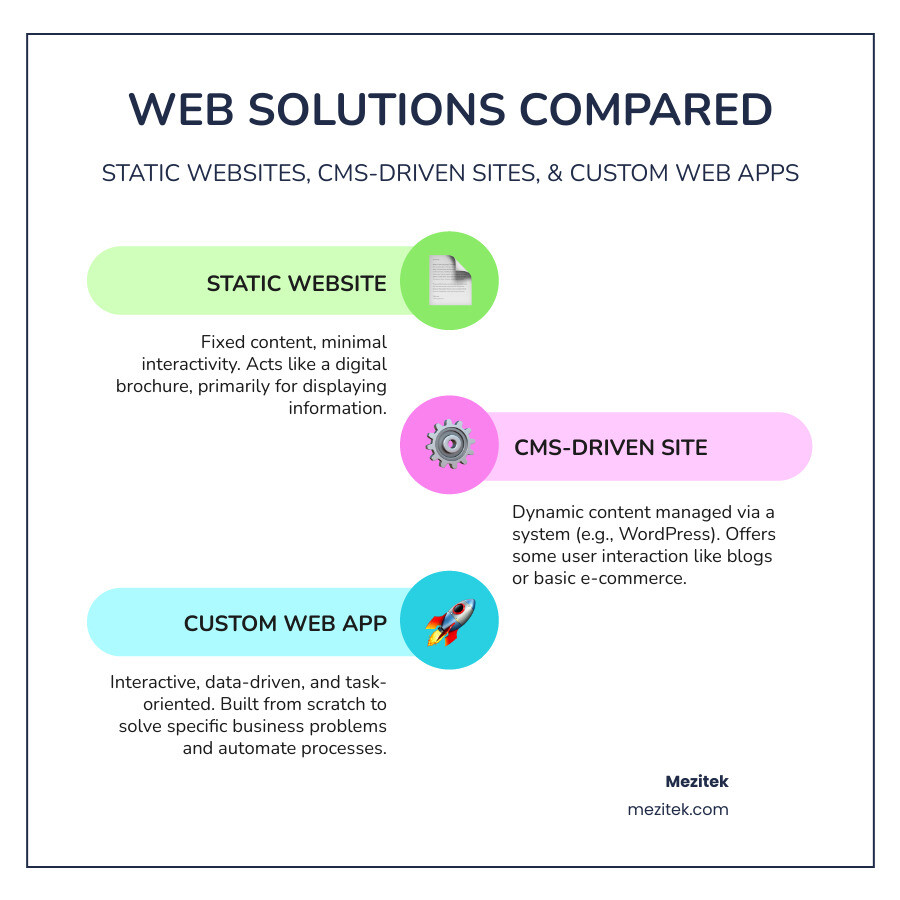
So, what exactly is a custom web application, and how does it truly differ from a standard website? While a traditional website primarily informs, displaying static or dynamic content like a digital brochure, a custom web application does things. It’s an interactive tool designed to perform specific functions, process data, and solve unique business problems. Think of it this way: a website is a book you read, while a web application is a specialized tool you use to build something.
The biggest difference lies in interactivity and purpose. A standard website might have a contact form or a blog, but its core function is content delivery. A custom web application, however, is built from the ground up to handle complex tasks, manage user interactions, and often integrates with other systems. It’s a dynamic environment where users can log in, manipulate data, automate processes, and achieve specific objectives custom to your business.
Why should a business even consider investing in a custom web application? The answer is simple: to open up its full potential and gain a significant competitive edge. The custom web app development market is expected to grow by 22.5% through 2030, a clear indicator of the rising demand for custom software solutions. Businesses are realizing that generic, off-the-shelf software often leaves crucial gaps in their operations.
A custom solution allows you to create unique services and experiences that differentiate you in the market. It empowers you to streamline operations, reduce manual effort, and improve customer satisfaction in ways that standardized tools simply cannot. This isn’t just about having a fancy tool; it’s about building a powerful engine for efficiency, sales, and scalability that truly reflects your business’s rules.
We believe in Innovative Web Solutions that empower businesses, big or small, to stand out.

Core Benefits of a Custom Solution
Let’s dive deeper into the primary benefits of investing in a custom web application:
- Best Efficiency and Process Automation: This is often the biggest win. Custom apps are built to mirror your exact workflows, automating time-consuming, repetitive tasks that generic software might overlook. Imagine a freight company tracking shipments with an internal dashboard, or a marketing agency streamlining project management. These applications can save your business countless hours and significant money by eliminating manual data entry and optimizing processes.
- Future-Proofing and Scalability: Unlike off-the-shelf software with rigid structures, custom applications are designed to scale with your business. As you grow, add new services, or pivot strategies, your custom app can evolve alongside you. It’s built on a flexible architecture that allows for new features and increased user loads without needing a complete overhaul, ensuring a long-term return on your investment.
- Seamless Integration: Your business likely uses various tools—CRM, accounting software, inventory management. A custom app can be designed to integrate seamlessly with these existing systems via APIs, creating a unified ecosystem. This eliminates data silos, reduces duplicate entries, and ensures smooth data exchange across your entire operation, improving overall accuracy and efficiency.
- Improved Security and Compliance: With a custom solution, you have complete control over your data and security protocols. This is particularly crucial for businesses handling sensitive information. You can implement specific security measures, encryption standards, and ensure compliance with industry regulations like GDPR or HIPAA, offering a level of protection that off-the-shelf solutions might not guarantee.
- Superior Branded User Experience (UX): A custom web app is crafted with your specific users in mind, whether they are employees or customers. This means an intuitive, easy-to-use interface that aligns perfectly with your brand identity. A better UX leads to higher user adoption, increased employee productivity, and improved customer satisfaction. Think of a perfectly custom suit versus one off the rack – it just fits better.
- New Revenue Streams and Market Opportunities: By offering unique functionalities or services that no other competitor provides, a custom app can open up entirely new avenues for revenue. This could be a specialized product configurator, a unique booking system, or a bespoke online marketplace that caters to a niche audience. It allows you to innovate and disrupt your market.
Real-World Examples of Custom Web Applications
To truly grasp the power of custom web applications, let’s look at some real-world examples:
- Internal Tools & Dashboards: Companies like Amazon use internal dashboards to provide operational visibility, tracking key metrics and performance in real-time. A custom internal tool could be a freight company’s dashboard for tracking shipments, a construction company’s unified operations portal for project management and timesheets, or simply a custom system for managing internal data that Google Sheets can’t quite handle.
- Custom CRMs (Customer Relationship Management): While many off-the-shelf CRMs exist, a custom one can be built to track unique customer interactions, sales pipelines, and communication specific to your business model. For instance, a company might build a customized CRM solution to significantly improve its customer service processes and satisfaction scores. Toyota also famously implemented a custom ERP system to optimize its just-in-time manufacturing, minimizing waste and improving efficiency.
- Project Management Portals: For marketing agencies, consulting firms, or even law firms, a custom project management portal can centralize client communication, task assignments, and document sharing, enhancing collaboration and transparency.
- Customer-Facing Apps:
- Product Configurators: Nike By You allows customers to personalize shoes, making the shopping experience highly interactive and unique. A furniture company could offer a “build-your-own-sofa” app.
- Online Booking Systems: A tour company can sell tickets directly through their website with integrated inventory data and payment processing, allowing customers to book and receive tickets instantly. Similarly, a dental practice could have a secure patient portal for appointment booking.
- E-commerce Platforms: Beyond basic online stores, custom e-commerce apps can offer unique product displays, personalized recommendations, or complex pricing rules that differentiate them from standard platforms.
- Enterprise Systems: Large organizations often rely on custom ERP (Enterprise Resource Planning) systems to integrate sales, marketing, operations, and customer support, ensuring all departments work in sync.
- Learning Management Systems (LMS): A corporate training company might develop a custom LMS with interactive coding challenges or specialized content delivery custom to their unique curriculum.
- Patient Portals: Hospitals or clinics can create secure portals for appointment management, accessing medical records, and patient information, ensuring privacy and ease of access.
These examples demonstrate that custom web applications aren’t just for tech giants. They are powerful tools that any business, regardless of size, can leverage to solve specific problems, improve operations, and create unique value for their customers.
The Development Lifecycle: From Idea to Launch
Developing a custom web application is an exciting journey that transforms an idea into a tangible, functional tool. It’s a structured process, often following an Agile methodology, which emphasizes flexibility, collaboration, and continuous improvement through iterative cycles. While the specifics can vary, the core stages remain consistent.
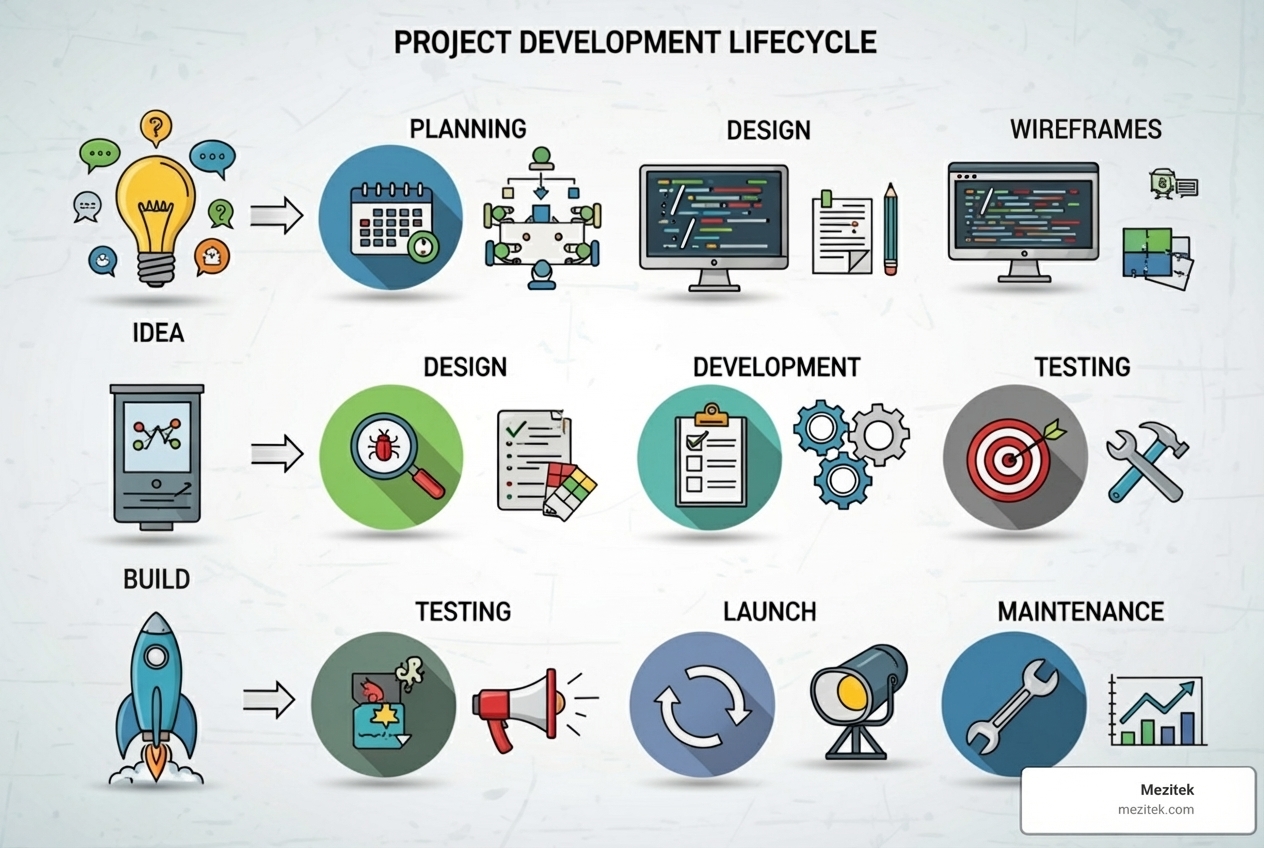
Step 1: Planning and Defining Requirements
This is arguably the most crucial stage, the “why” and “what” of your project. Rushing this phase is the number one cause of project failure.
- Problem Identification: Clearly define the specific problem your custom web application will solve. What pain point does it address for your business or your customers?
- Target Audience: Who will be using this application? Understanding your users’ needs, behaviors, and technical comfort levels is vital for successful design and development.
- Minimum Viable Product (MVP): Especially for startups or those new to custom development, focus on the core features needed for the first version. An MVP allows you to launch faster, gather real user feedback, and iterate. Many successful companies started with an MVP.
- Functional Requirements: Detail what the application must do. List every feature, every interaction, and every data point it needs to handle.
- Creating a Product Requirements Document (PRD): All these details should be documented in a comprehensive product requirements document (PRD). This document serves as a blueprint, guiding the entire development team and ensuring everyone is on the same page. For simpler projects, a less formal blueprint might suffice.
- Mezitek Tip: Just as with any website, a solid foundation is key. Consider best practices for website architecture even when planning a complex web application, as it impacts performance and scalability.
Step 2: Choosing Your Technology Stack
The “tech stack” refers to the combination of programming languages, frameworks, databases, and servers used to build and run your custom web application. This choice impacts performance, scalability, security, and even how easy it is to find developers for maintenance.
- Front-End Frameworks (Client-Side): This is what users see and interact with in their browser. These frameworks provide tools for building interactive user interfaces.
- Modern JavaScript Frameworks: Popular choices include React, Angular, and Vue.js, which are known for their efficiency in building complex, interactive user interfaces.
- Back-End Frameworks (Server-Side): This is the “brain” of your application, handling data storage, business logic, user authentication, and communication with databases.
- Python Frameworks: Options like Django and Flask are used for building everything from complex applications to simpler APIs.
- PHP Frameworks: Frameworks like Laravel are popular for simplifying common web development tasks.
- Ruby Frameworks: Ruby on Rails is known for an approach that allows for rapid development.
- Node.js Frameworks: Express is a common choice for building APIs and web applications.
- Databases: Where your application’s data is stored.
- SQL Databases (Relational): MySQL, PostgreSQL, SQL Server. Best for structured data with clear relationships (e.g., user profiles, orders).
- NoSQL Databases (Non-Relational): MongoDB, Cassandra. Best for unstructured or semi-structured data, high scalability, and flexible schemas (e.g., user-generated content, real-time data).
- Hosting: Where your application lives on the internet.
- Cloud Providers: Amazon Web Services (AWS), Google Cloud Platform (GCP), Microsoft Azure. Offer robust, scalable, and highly configurable infrastructure.
- PaaS (Platform as a Service): Heroku, Firebase. These platforms simplify deployment and management, allowing developers to focus more on code.
- Lower-cost options: Digital Ocean, Linode. Good for managing your own Virtual Machines (VMs).
Choosing the right stack requires careful consideration of your application’s specific needs, expected traffic, budget, and the expertise available. A good tech stack ensures your application is performant, secure, and scalable for the long term.
Making the Right Choice: Costs, Challenges, and Modern Solutions for Custom Web Applications
Deciding whether a custom web application is right for your business involves weighing its unique advantages against potential costs and challenges. It’s about determining if the return on investment (ROI) justifies the effort.
A custom solution is ideal when:
- Off-the-shelf software doesn’t meet your specific needs, forcing inefficient workarounds.
- You have unique workflows that provide a competitive advantage.
- You need seamless integration with complex existing systems.
- Data security and specific compliance requirements are paramount.
- You envision a unique user experience that differentiates your brand.
If you can prove a clear, positive ROI – for instance, “this app will save X hours per week” or “it will open up Y new revenue stream” – and the value of X or Y outweighs the cost of the app, then you’re ready to invest.
Understanding Costs, Timelines, and Potential Challenges
Let’s be upfront: custom web application development is an investment, but one with significant payoffs when done right.
- Cost Ranges: The price tag for a custom web app varies widely based on complexity and features.
- Simple Web Apps: A basic application with core functionalities (like a simple internal tool or a lead generation form with backend processing) may cost between $10,000-$50,000.
- Complex Web Apps: Applications with extensive features, complex integrations, advanced user roles, or high-security requirements can range from $50,000-$250,000+, with enterprise-grade solutions potentially exceeding $500,000.
- Timelines: Just like costs, timelines depend on scope.
- Basic Custom Web App: Typically takes 1-4 months to build.
- Fully-Featured or Complex Web App: Can take 6-12 months or even longer for very large, intricate systems.
However, these are just estimates. The actual time and cost depend on the project’s specifics, the development team’s expertise, and the chosen technology stack.
- Common Challenges or Drawbacks:
- Scope Creep: This happens when new features are continuously added during development, expanding the project beyond its initial scope. It leads to budget overruns and delayed launches. Mitigation: A clear PRD and strict change management processes.
- Budget Overruns: Often linked to scope creep or unforeseen technical complexities. Mitigation: Realistic budgeting, contingency funds, and agile development that allows for adjustments.
- Poor User Adoption: If the app isn’t intuitive or doesn’t truly solve user problems, it won’t be used. Mitigation: Involve end-users early and often in the design and testing phases.
- Technical Debt: This refers to the hidden cost of choosing an easy, fast solution now instead of a better approach that would take longer. It makes future updates and maintenance difficult and expensive. Mitigation: Prioritize clean code, robust architecture, and regular refactoring.
The Role of AI and Modern Development Tools in Custom Web Applications
The landscape of custom web application development is rapidly evolving, thanks to AI and the rise of no-code/low-code platforms. These tools are democratizing development, making it more accessible and affordable for freelancers and small business owners.
- Democratizing Development: No longer do you need to be a seasoned programmer to build powerful applications. AI-powered platforms can generate entire web apps, including pages, databases, and logic, from a simple text description.
- Faster Prototyping and Reducing Costs:
- AI-driven Generation: Modern tools allow you to “describe your app idea in plain language,” and AI handles much of the technical implementation. You can then fine-tune the result with visual editors. This drastically speeds up the initial phases of development and reduces the need for extensive coding.
- Visual Development Tools (No-code/Low-code): These platforms offer drag-and-drop interfaces and pre-built components that allow you to assemble sophisticated applications with minimal or no coding. This means:
- Reduced Development Time: What once took months can now take weeks or even days.
- Lower Costs: Less reliance on expensive developers for every line of code.
- Increased Agility: Businesses can rapidly build, test, and iterate on applications, responding quickly to market changes.
- Bridging the Gap: These platforms offer a “middle ground” between off-the-shelf solutions and full custom builds. They provide the flexibility of custom development without the high entry barrier of traditional coding. For many small businesses, this is the smartest, fastest, and most cost-effective path to getting an “app-like” dynamic experience.
- Mezitek Tip: Curious about how AI can boost your design process? Explore our insights on the Best AI Tools for Web Designers to see how these technologies are changing the game.
While these tools are powerful, it’s important to understand their limitations. For highly complex, unique functionalities or extreme performance demands, a full custom build might still be necessary. However, for a vast majority of business needs, modern tools offer a compelling alternative.
Post-Launch: Ensuring Long-Term Success
Launching your custom web application is a huge milestone, but it’s not the end of the journey. In fact, it’s just the beginning of its life cycle. To ensure your application remains effective, secure, and performant, ongoing attention is critical. Think of it like a garden – you plant it, but then you need to water, weed, and prune it to thrive.
- Continuous Improvement: The digital world is constantly changing, and so are user expectations. Regularly gather user feedback, analyze performance data, and identify areas for improvement. This iterative process allows you to refine features, improve usability, and ensure the application continues to meet evolving business needs.
- User Feedback Loop: Establish clear channels for users to provide feedback. This could be in-app surveys, dedicated support channels, or usability testing. Acting on this feedback is crucial for driving user adoption and satisfaction.
Ongoing Maintenance and Security
Post-launch maintenance and security are non-negotiable for any custom web application. Neglecting these aspects can lead to vulnerabilities, performance issues, and ultimately, a failing application.
- Security Patches: Software, frameworks, and libraries constantly have new vulnerabilities finded. Regular security patches are essential to protect your application and user data from cyber threats. Almost half of all small businesses fall victim to data breaches annually, highlighting the importance of proactive security.
- Bug Fixes: Even the most rigorously tested applications can have bugs surface in live environments. Promptly addressing these ensures a smooth user experience and prevents frustration.
- Performance Monitoring: Continuously monitor your application’s speed, responsiveness, and resource usage. Tools can track load times, server response, and user interactions. Fast loading times (ideally under 2 seconds) are crucial for user retention and business transactions.
- Regular Updates: The technology stack your application is built on (operating systems, databases, frameworks, libraries) receives updates. Keeping these components current ensures compatibility, access to new features, and improved security.
- Following OWASP Security Best Practices: Adhering to guidelines from organizations like OWASP (Open Web Application Security Project) is critical for building and maintaining a secure application. This includes secure coding practices, proper authentication and authorization, input validation, and protection against common web vulnerabilities.
- Maintenance Budget: A good rule of thumb is to budget 15-20% of the initial development cost per year for ongoing maintenance. This covers hosting, security patches, bug fixes, minor improvements, and keeping the tech stack up-to-date. This ongoing investment is crucial for the long-term health and success of your custom web application.
For freelancers and small business owners, this means either dedicating time to learn these maintenance tasks or partnering with a reliable development team for ongoing support. The cost of not maintaining your application can far outweigh the cost of proactive care.
Frequently Asked Questions about Custom Web Applications
What’s the main difference between a custom web app and a standard website?
A standard website primarily informs (like a brochure or blog), providing content for users to consume. A custom web application is interactive and performs specific tasks, allowing users to input data, manipulate information, and achieve specific objectives (like a project management tool, an online calculator, or a booking system). It’s about ‘doing’ versus ‘reading’.
How much does a simple custom web app cost?
A simple application with basic features, often an MVP (Minimum Viable Product), typically ranges from $10,000 to $50,000. This cost can fluctuate based on the complexity of features, the chosen technology stack, and the rates of the development team you work with.
Can I build a custom web app without coding?
Absolutely! The rise of modern visual development tools and no-code/low-code platforms has made it possible for freelancers and small business owners to build powerful custom web applications with minimal to no coding. These tools use drag-and-drop interfaces and pre-built components, significantly reducing development time and cost, and democratizing access to custom solutions.
Conclusion
We’ve explored custom web applications, from their fundamental differences from standard websites to their profound impact on business efficiency, competitive advantage, and customer satisfaction. We’ve seen how these custom digital tools can automate workflows, scale with your growth, integrate seamlessly with existing systems, and provide a superior, branded user experience.
The journey of building a custom web application involves careful planning, strategic technology choices, and a commitment to ongoing maintenance and security. While traditional development can be a significant investment in time and money, the emergence of AI and no-code/low-code platforms is making custom solutions more accessible than ever before, empowering freelancers and small business owners to create powerful tools without extensive coding knowledge.
A custom web application is more than just software; it’s a strategic asset that allows your business to operate by its own rules, not the limitations of off-the-shelf products. It’s about solving your unique problems, serving your customers better, and gaining a distinct edge in a competitive market.
At Mezitek, we believe in empowering businesses to take control of their digital presence. Whether you’re considering a full custom build or exploring modern, accessible alternatives, understanding these solutions is the first step towards open uping your business’s true potential. Ready to take charge of your digital tools? Explore powerful platforms by finding the best WordPress alternatives for your next project.