Why No-Code Website Builders Are Changing How We Build Online
No-code website builders are platforms that let you design, build, and publish websites using visual tools instead of writing code. Here’s what you need to know:
Quick Answer: Best No-Code Builders by Use Case
- For Marketing Sites & Portfolios: Look for builders with strong design flexibility and rich templates.
- For E-commerce: Prioritize platforms with built-in payment processing and inventory management.
- For Web Applications: Choose tools with robust database and workflow capabilities.
- For Landing Pages: Select builders that are simple, fast, and optimized for conversions.
- For Budget Projects: Consider lightweight builders that offer affordable plans for simple sites.
The no-code development market is projected to reach $45.5 billion by 2025. That’s not hype—it’s a fundamental shift in how websites get built.
Here’s the reality: traditional website development can take weeks or months. No-code platforms can reduce development time by up to 90%. While traditional CMS platforms power a large portion of the web, newer no-code builders are gaining ground fast with millions of users worldwide. By some estimates, citizen developers will soon outnumber professional developers by four to one.
But here’s what most people get wrong about no-code: it doesn’t mean “no skill required.” As one developer put it: “No-code doesn’t necessarily make things easier, but it makes the design and development process much faster and more efficient.”
You still need to understand web design basics. You still need to know what makes a good user experience. The difference? You’re not fighting with code syntax or debugging JavaScript errors. You’re focusing on what matters—creating experiences that work for your clients.
For freelancers and agency professionals, this changes everything. You can prototype faster. You can iterate based on client feedback without rebuilding from scratch. You can offer services beyond basic design—like AI-powered personalization, conversion optimization, and dynamic content management—without needing a full development team.
The catch? Not all no-code builders are created equal. Some are great for simple portfolios but fall apart when you need e-commerce. Others excel at web apps but struggle with SEO. And platform lock-in is real—migrating later usually means rebuilding from scratch.
This guide cuts through the noise. We’ll show you which platforms excel at what, what features actually matter, and how to choose the right tool for each project type.
Must-know No-code website builders terms:
Key Features to Demand From Your No-Code Platform
When we explore no-code website builders, it’s easy to get impressd by flashy interfaces and promises of instant websites. But to truly choose a platform that empowers your vision, we need to look under the hood at the core features that drive success. These aren’t just bells and whistles; they’re the foundational elements that determine how flexible, scalable, and effective your website will be. We’re talking about intuitive visual editors, robust customization options, the ability to grow with your business, and seamless integrations with other essential tools.

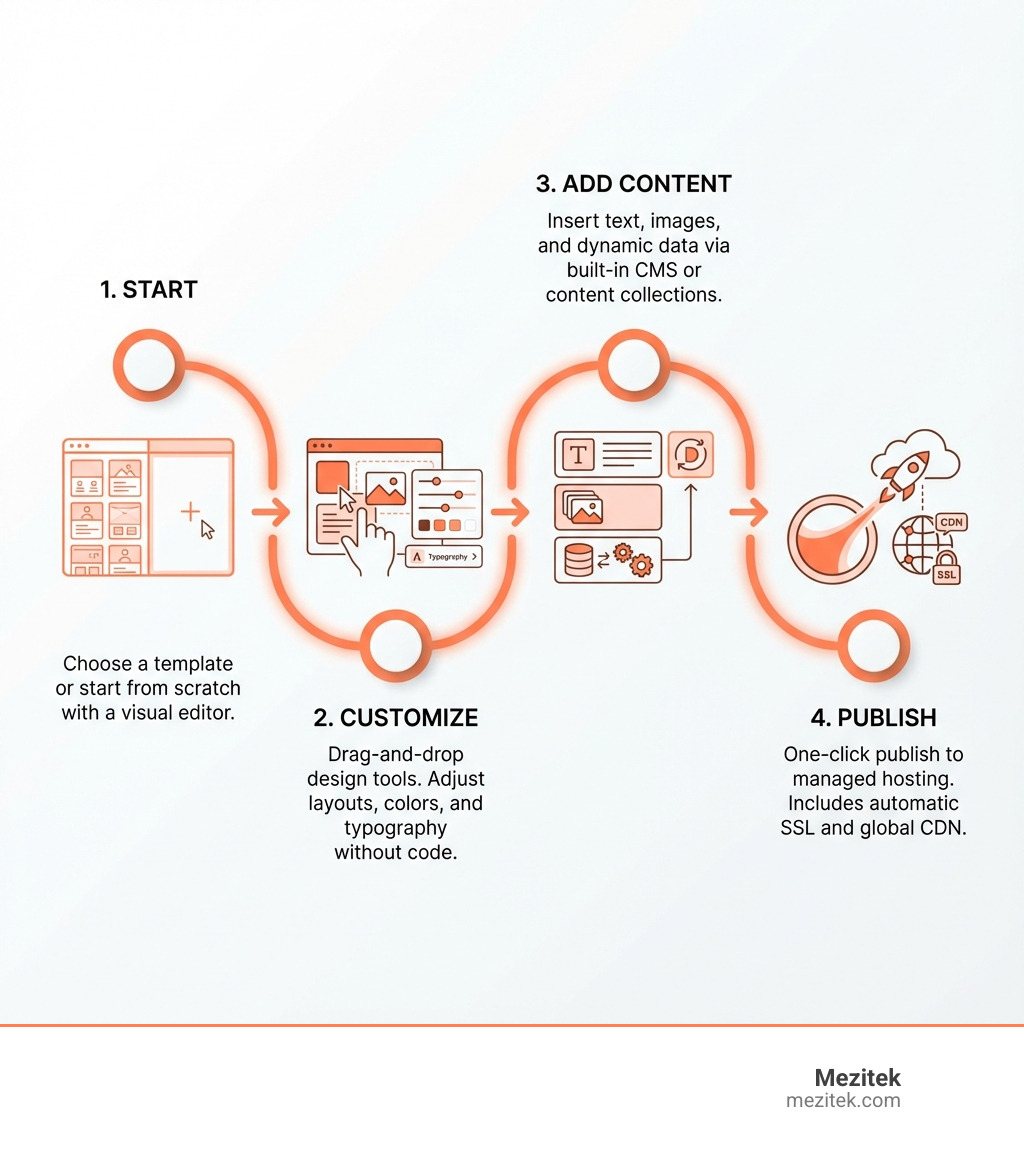
A good no-code platform should feel like an extension of your creative mind, not a frustrating barrier. It should offer a visual editor that allows for drag-and-drop functionality, giving you a real-time preview of your changes. Templates are crucial starting points, providing professionally designed foundations, but true power comes from the ability to customize every aspect. Scalability ensures your site can handle increased traffic and new features as your business grows. Finally, integrations connect your website to the wider digital ecosystem, from e-commerce to analytics and marketing tools. For more insights into how these features drive innovation, check out our page on More info about our innovative web solutions and explore broader industry context in the Low-code development platform overview on Wikipedia.
Design Flexibility and Customization
This is where the magic happens for many of us. The reason we choose no-code website builders is to have control over the look and feel without wrestling with code.
- Responsive Design: In today’s multi-device world, a website must look good on desktops, tablets, and phones. A top-tier no-code builder will automatically handle responsive design, adjusting layouts gracefully. Many even offer a dedicated mobile editor to fine-tune the experience for smaller screens.
- Pre-built Templates: These are your starting blocks. Some platforms boast hundreds of customizable templates, while others offer a more curated selection of professional designs. They save immense time, offering professional aesthetics right out of the box.
- Blank Canvas Option: For those who crave ultimate creative freedom, many platforms allow you to start from scratch. This gives you pixel-perfect control, letting you translate your design vision without battling restrictive templates.
- Advanced Design Elements & Animation Tools: Beyond static elements, some builders offer sophisticated animation and interaction tools. Certain platforms are known for their focus on visual design and motion, allowing for modern, animated websites with rich interactions. For a deeper dive into making your designs come alive, explore Learn about visual design and motion in no-code platforms.
Content Management and Dynamic Data
A website isn’t just pretty pictures; it’s about content. How easily can we manage that content, and how dynamic can it be?
- Built-in CMS (Content Management System): For blogs, portfolios, product catalogs, or any content-rich site, a robust CMS is essential. The best platforms handle complex content structures and allow you to build a custom system without touching PHP or database code.
- Dynamic Pages: Imagine having a template for blog posts, and each new post automatically populates that template. That’s dynamic pages at work. This feature is crucial for scaling content efficiently, turning content collections into live, searchable pages.
- Content Collections: This refers to structured databases where you store your content (e.g., blog posts, team members, products). Some platforms allow for extensive database management, enabling highly functional web applications.
- On-page Editing: The ability to make content changes directly on the live website, seeing how new copy will look in real-time, is a huge time-saver. Look for builders with a seamless visual editing experience.
For a comprehensive understanding of how content is managed efficiently, refer to A guide to Content Management Systems.
SEO and Marketing Capabilities
Building a beautiful website is only half the battle; we also need people to find it! Search Engine Optimization (SEO) is paramount, and good no-code website builders offer built-in tools to help us rank.
- Meta Titles and Descriptions: These snippets appear in search results, and customizable meta tags are a must for telling search engines (and users) what your page is about.
- Alt Tags: Essential for image accessibility and providing search engines context about your visuals.
- Clean URLs: Short, descriptive, and keyword-rich URLs are better for both users and search engines.
- 301 Redirects: When you move a page, you need to tell search engines where it went. Proper 301 redirects prevent broken links and preserve SEO value.
- Sitemaps: Automatically generated sitemaps help search engines crawl and index your site more effectively.
- Email Marketing Integration: Connecting your site to email marketing platforms helps you capture leads and nurture your audience.
- Social Media Tools: Easy sharing buttons, Open Graph tags (for rich social media previews), and integrations with social platforms are key for promotion.
Most modern no-code website builders include essential SEO features. The best platforms offer granular control over metadata and site structure, which is crucial for sites that need to rank. For optimizing your presence online, our guide on Website Landing Page Optimization offers valuable strategies.
Security and Hosting
Behind every successful website is reliable security and hosting. With no-code website builders, much of this heavy lifting is handled for us, but know what to expect.
- Managed Hosting: The platform itself hosts your website, meaning you don’t need to worry about server setup, maintenance, or updates. This is a huge convenience.
- SSL Certificates: Essential for securing data transferred between your site and visitors, indicated by the padlock icon in the browser. Reputable builders provide these automatically.
- Uptime Guarantees: These ensure your website is almost always accessible to visitors. Look for platforms that boast 99.9% uptime or higher.
- Automatic Backups: In case of an accidental deletion or issue, automatic backups are a lifesaver, allowing you to restore previous versions of your site.
- User Roles and Permissions: For collaborative projects, these features allow you to control who can access and edit different parts of your site, adding a layer of security.
Reputable no-code website builders maintain strong security standards, including protection against common vulnerabilities. However, we’re still responsible for basics like strong passwords and managing user access. For those with highly sensitive data, some platforms offer features to assist with compliance for standards like HIPAA.
No-Code vs. Traditional Development
The rise of no-code website builders has fundamentally changed the conversation around web development. It’s no longer just a choice between doing it yourself with code or hiring a development firm; there’s a powerful middle ground. Let’s break down how no-code stacks up against traditional, hand-coded development.
| Factor | No-Code Website Builders | Traditional Development |
|---|---|---|
| Speed to Market | Fast (days to weeks) | Slower (weeks to months) |
| Cost | Lower upfront and ongoing costs (often subscription-based) | Higher upfront and ongoing costs (developer salaries, hosting) |
| Technical Skill Required | Low to moderate (visual design, logic) | High (coding languages, frameworks, databases) |
| Flexibility/Customization | High within platform limits; some constraints | Nearly limitless; full control over code and functionality |
| Maintenance | Handled by the platform (hosting, security, updates) | Requires dedicated effort (server management, security patches, code updates) |