Why Developers Are Searching for Better Options
WordPress alternatives for developers have become one of the hottest topics in web development circles. While WordPress powers over 43% of all websites on the internet, many developers are quietly—or not so quietly—looking for a way out.
Here are the top developer-friendly alternatives to consider:
| Category | Best For | Key Advantage |
|---|---|---|
| Headless CMS | Complex web applications | API-first, frontend freedom |
| Flat-File CMS | Git-based workflows | No database, version control friendly |
| Static Site Generators | Blogs and documentation | Blazing speed, maximum security |
| Visual Development Platforms | Designers who code | Clean code output, built-in hosting |
| Framework-Based CMS | Enterprise solutions | Modern architecture, scalability |
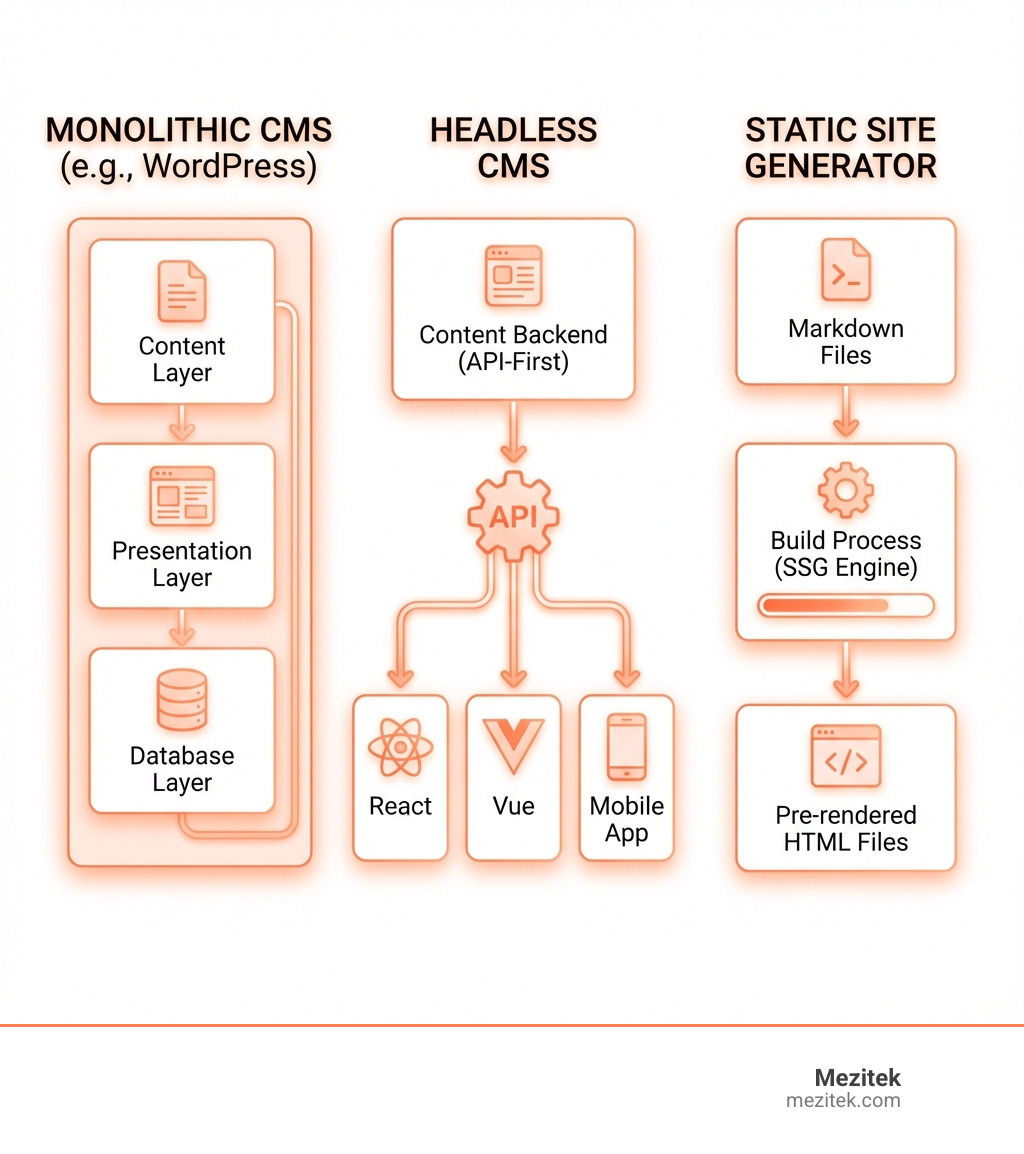
The reason for this shift is simple: WordPress wasn’t built for modern developer workflows. Its database-heavy architecture, plugin conflicts, and security vulnerabilities (96% of hacked websites run WordPress) make it increasingly difficult to maintain and scale.
Developers today want control. They want clean code. They want to use Git for version control, deploy with confidence, and build with modern JavaScript frameworks like React or Vue.js.
The good news? The ecosystem of alternatives has matured significantly. Whether you’re building a simple blog, a complex web application, or something in between, there’s likely a better tool for the job than WordPress—one that fits naturally into your development workflow instead of fighting against it.
WordPress alternatives for developers vocab explained:
Why Developers Are Moving Beyond WordPress
For years, WordPress has been the default choice for website creation. Its accessibility and vast ecosystem made it a powerhouse. However, for many developers, the very strengths that made WordPress popular have become its biggest weaknesses. We’ve seen a growing desire for platforms that offer more robust solutions, better performance, and a development experience that aligns with modern practices.

One of the most pressing concerns is security risks. It’s a sobering fact that 96% of hacked websites are running WordPress. This statistic alone highlights a significant vulnerability that developers are increasingly unwilling to overlook. The constant cycle of updates, coupled with potential plugin conflicts and vulnerabilities in third-party extensions, can turn website maintenance into a never-ending battle.
Then there are the performance bottlenecks. WordPress’s database-heavy architecture can lead to slower loading times, especially as a site grows or requires more complex functionalities. For developers and their clients, speed is paramount for user experience and SEO. We’ve found that the overhead of a traditional WordPress setup often hinders optimal performance.
The outdated development experience is another major driver for change. Many developers find WordPress’s reliance on PHP and its traditional theme/plugin structure limiting. Integrating modern tools like Git for version control or implementing streamlined deployment processes can be cumbersome. This often means fighting against the platform rather than flowing with it, leading to frustration and inefficient workflows. Developers crave environments that support clean code, modularity, and seamless integration with their preferred toolchains.
At Mezitek, we believe in building robust and efficient digital foundations. Understanding these pain points is the first step towards choosing a better path. For more insights into structuring your digital presence, explore our guide on Best Practices for Website Architecture.
Top WordPress Alternatives for Developers: A Deep Dive
The landscape of web development has evolved dramatically, and with it, a plethora of powerful WordPress alternatives for developers have emerged. These tools cater to various project types and developer preferences, offering improved flexibility, performance, and control. Let’s explore some of the leading categories.
Headless CMS: For Ultimate Flexibility and API-First Development
Imagine a content management system where the content is completely separated from its presentation. That’s the essence of a Headless CMS. This decoupled architecture accepts an API-first approach, meaning your content is delivered via APIs to any frontend you choose.
This provides frontend freedom like never before. Developers can use their preferred modern JavaScript frameworks such as React, Vue.js, Svelte, or even build native mobile applications. This separation allows for true omnichannel content delivery, pushing content to websites, mobile apps, IoT devices, and more, all from a single source. These platforms offer robust APIs that developers can easily integrate with, providing unparalleled control over the user experience.
Headless CMS solutions are ideal for complex web applications, dynamic content experiences, and when you need to power Progressive Web Apps. They are particularly powerful for enterprise solutions where content needs to be managed centrally but distributed across diverse platforms. At Mezitek, we leverage our expertise in headless CMS solutions to build highly scalable and flexible digital experiences custom to our clients’ unique needs. Platforms like Craft CMS, for instance, are praised for separating content from presentation, allowing for true omnichannel content management and offering highly customizable content modeling. Wagtail, an open-source Django CMS, also provides excellent developer flexibility and frontend freedom for designers.
Flat-File CMS: For Simplicity, Speed, and Version Control
For developers who appreciate simplicity and a direct approach to content management, Flat-File CMS solutions are a breath of fresh air. The core idea here is a no database dependency. Instead of storing content in a complex database, these systems use plain files and folders.
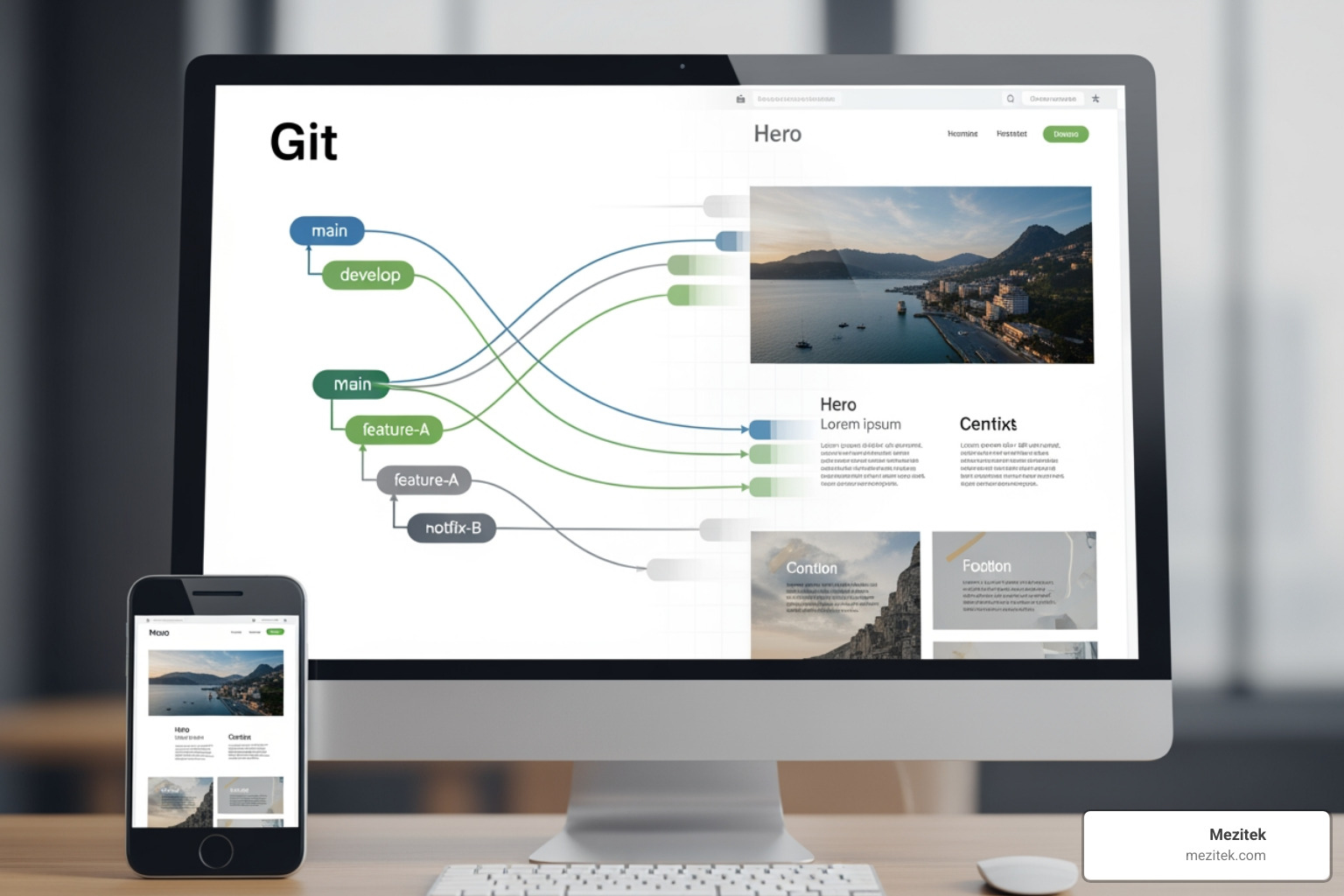
This architecture lends itself perfectly to Git-powered workflows, making version control an inherent part of your content management. Every change can be tracked, reverted, and collaborated on just like code. Content is typically Markdown-based, which is developer-friendly and easy to read.
The benefits are numerous: improved security (no database to exploit), fast performance (no database queries), and simple backups and migration (just copy your files!). Platforms like Kirby and Grav exemplify this approach. Kirby, for example, is lauded for being lightweight, secure, and easy to manage with Git. Grav is designed for building “faster websites” due to its flat-file nature. At Mezitek, we value clean and efficient systems, which is why we offer support for flat-file CMS implementations, helping our clients benefit from their inherent advantages.
Static Site Generators (SSGs): For Blazing-Fast Performance and Security
If speed and security are your top priorities, then Static Site Generators (SSGs) might be your ideal WordPress alternative for developers. These tools work by taking your content and templates and pre-rendering HTML files during a build process. The result? Pure, static HTML, CSS, and JavaScript files that are then served directly to users.
This process leads to unbeatable speed as there’s no server-side processing or database queries on each request. It also results in a minimal attack surface, making them incredibly secure since there’s no dynamic backend code to exploit. These factors contribute to significant SEO benefits and allow for low-cost/free hosting on platforms like GitHub Pages. You can even host your Jekyll site for free on Free hosting with GitHub Pages.
SSGs are excellent for blogs, portfolios, documentation sites, and any content that doesn’t require frequent, real-time dynamic updates. Popular choices include Jekyll, Hugo, and Astro. Hugo, for instance, boasts build times in seconds and supports multiplatform and multilingual content authoring using Markdown. Astro is particularly flexible, allowing developers to add dynamic content on top of static pages, or mix static pre-rendered pages with dynamic server-side rendered pages. Our team at Mezitek has extensive experience with static site generator workflows, helping businesses harness their power for lightning-fast and secure websites.
Visual Development Platforms: The best WordPress alternatives for developers who are designers
For developers who also have a keen eye for design, or for those working closely with design teams, visual development platforms bridge the gap between design and code. These tools offer a visual canvas that allows for precise control over layout and aesthetics, while still producing clean code output without the bloat often associated with page builders.
They often function as an all-in-one environment, combining design, content management, and publishing. Many come with built-in hosting and SSL certificates, simplifying deployment. Features like advanced animations and interactions can be implemented without additional tools or heavy coding. This gives developers precise design control over every element, making them ideal for crafting highly polished marketing sites, landing pages, and creative portfolios.
Webflow is a prime example, offering complete design freedom without needing extensive coding. Its drag-and-drop interface uses ‘containers’ and ‘classes’ for intuitive design, while still providing access to code if needed. Other platforms like Squarespace, with its Fluid Engine editor, offer fine-grained layout control and even allow for CSS injection or Developer Mode for deeper customizations. These platforms are perfect for businesses looking for Custom-Designed Business Websites that stand out. At Mezitek, our custom design and development services often integrate with such platforms to deliver visually stunning and highly functional sites.
Application Framework-based CMS: The best WordPress alternatives for developers building complex applications
When your project demands the robust capabilities of a modern application framework combined with content management, framework-based CMS solutions shine. These platforms are built on modern frameworks like Laravel (PHP), Django (Python), or Yii2 (PHP), inheriting their inherent extensibility and scalability.
They promote clean code practices and allow developers to leverage the full power of the underlying framework for custom logic, integrations, and complex functionalities. This makes them perfectly suited for enterprise solutions and custom applications where standard CMS features just won’t cut it. Examples include Craft CMS (built on PHP’s Yii2 framework) and Wagtail (an open-source Django CMS powered by Python). These platforms offer a blank canvas for developers to build exactly what clients need, providing a modern development experience for complex sites.
For organizations needing bespoke solutions that can grow and adapt, these CMS types offer the best of both worlds: structured content management within a powerful, flexible application environment. As a Custom Web Development Firm, Mezitek excels in custom CMS and application development, building solutions that are not just websites, but powerful business tools.
Key Trade-Offs and Considerations When Leaving WordPress
Transitioning away from WordPress, while offering many advantages for developers, also comes with its own set of considerations. It’s important to weigh these trade-offs to ensure the chosen alternative truly aligns with your project’s needs and your team’s capabilities.
The Learning Curve and Community Support
One of WordPress’s undeniable strengths is its massive community and the abundance of readily available tutorials, forums, and resources. For any problem, a quick Google search usually yields multiple solutions.
When moving to an alternative, developers will often encounter smaller, specialized communities. While these communities can be incredibly knowledgeable and supportive, they might not offer the same breadth of readily available answers. This can translate into a steeper learning curve for new frameworks or platforms. For instance, Webflow, despite its visual nature, has a steeper learning curve for those unfamiliar with its class-based styling system. Craft CMS, while developer-friendly, has a smaller community compared to WordPress.
The quality of documentation becomes paramount in such environments. Platforms like Kirby and Wagtail are often praised for their clear and comprehensive documentation, which can significantly ease the learning process. At Mezitek, we understand the importance of skill development, which is why we offer dedicated Courses and provide comprehensive training and support resources to help our clients and their teams get up to speed with new technologies.
Ecosystem: Plugins, Themes, and Integrations
WordPress boasts an almost limitless vast plugin library for virtually any functionality imaginable. However, this comes with a downside: the potential for bloat, plugin conflicts, and security vulnerabilities.
WordPress alternatives for developers typically offer more curated and focused ecosystems. While they might not have tens of thousands of plugins, the available extensions are often higher quality, better maintained, and designed to integrate seamlessly. This shift emphasizes quality over quantity. Many modern alternatives, especially Headless CMS and framework-based solutions, rely heavily on API-driven integrations rather than traditional plugins. This allows developers to connect their websites with a wide array of third-party services and tools, offering robust and reliable connections without the overhead of a bloated plugin architecture.
For example, Webflow has a more limited plugin ecosystem compared to WordPress, but it offers clean, custom code output. HubSpot Content Hub, while having a limited plugin ecosystem, excels in its built-in marketing tools and CRM integrations. Ghost, designed for blogging, comes with many built-in features like memberships and newsletters, and offers over 1000 integrations, reducing the need for external plugins. Our team at Mezitek specializes in creating Innovative Web Solutions and can help you steer the integration and customization needs for your chosen platform.
Cost Analysis: Total Cost of Ownership (TCO)
While WordPress itself is free, the total cost of ownership (TCO) for a WordPress site can often be higher than anticipated, with many WordPress hidden costs. These include:
- Hosting: Ranging from £15-£80+ monthly, depending on performance and scale.
- Premium themes & plugins: Often £40-£160 annually for themes and £12-£80+ per plugin annually for essential functionalities.
- Developer maintenance: £40-£120+ per hour for updates, bug fixes, and security patches.
- Security solutions: An additional £80-£240 annually.
- Backup solutions: £4-£40 monthly.
In contrast, WordPress alternatives for developers present varied pricing models. Many SaaS platforms like Webflow, Squarespace, and HubSpot CMS operate on subscription-based pricing (e.g., Webflow paid plans start at $14/month, Squarespace at $16/month, HubSpot CMS at $15/month). These often include hosting, security, and updates, simplifying cost prediction. Some open-source alternatives like Ghost (self-hosted is free, Ghost Pro starts at $9/month), Jekyll, Hugo, and Wagtail are free to use but require self-hosting costs. Others, like Kirby and ExpressionEngine, might have one-time license fees with optional annual updates.
When evaluating an alternative, it’s crucial to look beyond the initial price tag and consider all potential expenses. Our transparent pricing and value-driven solutions at Mezitek aim to provide clear cost benefits, helping you understand the real TCO of your chosen platform, whether it’s for WordPress Hosting or a new system entirely.
Migration Strategies and Challenges
Deciding to move from WordPress is one thing; actually doing it is another. The migration process can be complex, and understanding the migration strategies and challenges is crucial.
The primary challenge is moving content from WordPress. This can involve a database export, which then needs to be adapted to the new platform’s content structure, or a file-based migration for flat-file systems. A key step is content model mapping, where you define how your existing WordPress posts, pages, and custom post types will translate into the new system’s content types and fields. Implementing proper URL redirects is also vital to maintain SEO rankings and user experience post-migration.
Migration approaches vary widely:
- Manual Migration: Copy-pasting content, suitable for smaller sites.
- Automated Tools: Some platforms offer import tools, or third-party services can assist.
- Theme-first or Lift and Shift: For managed platforms like HubSpot or Webflow, you might rebuild the theme and migrate content.
- Custom Build: For solutions like Craft CMS or framework-based CMS, developers often custom-build the new site and migrate content programmatically.
A migration often presents a unique opportunity for a full redesign, allowing you to rethink your site’s architecture and user experience from the ground up. However, it also requires careful planning and execution. Exporting data from some platforms like Wix can be difficult, for example. Ghost allows content export as a single JSON file, which can simplify some aspects. At Mezitek, we offer comprehensive migration and replatforming services, guiding you through every step to ensure a smooth transition. For deeper insights into planning your website, check out our guide on How to Build a Website.
Frequently Asked Questions about Developer-Focused CMS
We often hear similar questions from developers considering a move away from WordPress. Let’s tackle some of the most common ones.
Which WordPress alternative offers the most control for developers?
For developers seeking the absolute maximum control, Headless CMS solutions and Static Site Generators (SSGs) stand out.
Headless CMS platforms offer unparalleled control over the frontend stack. By decoupling content from presentation, developers are free to use any framework (React, Vue, Angular, Svelte) and build custom user interfaces without any constraints from the CMS. This API-first design ensures a clean separation of concerns, allowing frontend and backend teams to work independently.
SSGs like Jekyll, Hugo, and Astro also provide immense control. Since they generate static HTML files, developers have complete command over the codebase. Hugo, for instance, offers a rich and powerful feature set, providing the framework and tools for full customization. Webflow also gives developers access to code if they want to dig into it, alongside its visual tools. Craft CMS is designed as a “blank canvas” for developers, offering precise control over content structure and presentation.
At Mezitek, we guide our clients based on their specific project needs, but generally, if granular control over every aspect of your site’s architecture and frontend experience is paramount, these categories are your best bet.
Are WordPress alternatives inherently more secure?
In many cases, yes, WordPress alternatives for developers can be inherently more secure than a typical WordPress installation.
The statistic that 96% of hacked websites run WordPress is a stark reminder of its vulnerabilities. This is often due to its large attack surface (core, themes, plugins) and database-driven nature.
Many alternatives address these issues:
- Smaller Attack Surface: Platforms with a more focused feature set or a curated plugin ecosystem naturally have fewer potential entry points for attackers.
- Modern Codebases: Many newer alternatives are built on modern frameworks with security best practices baked in.
- No Database: SSGs and Flat-File CMS (like Kirby or Grav) eliminate the database, which is a common target for attacks. This removes a significant point of vulnerability.
- Managed Security in SaaS Platforms: Hosted solutions like Webflow, Shopify, HubSpot CMS, and Squarespace handle security, updates, and maintenance for you, providing enterprise-grade security, 99.99% uptime, and global CDNs.
While no system is 100% impervious to attacks, choosing an alternative with a leaner architecture or robust managed security can significantly improve your site’s overall security posture. At Mezitek, we adopt a security-first approach in all our development, ensuring that your digital assets are protected.
Can I still provide an easy-to-use admin panel for my clients?
Absolutely! One common misconception is that moving away from WordPress means sacrificing an intuitive content editing experience for clients. On the contrary, many modern WordPress alternatives for developers excel in this area.
Platforms like Craft CMS are known for their flexible, user-friendly CMS that prioritizes content modeling and customisation, making it easy for content editors to manage complex sites. Wagtail, the open-source Django CMS, boasts an “intuitive interface” and its StreamField feature gives editors creative control over content structures without needing developer intervention. Kirby CMS is also praised for its “great design and UX” and simple structure, making content management straightforward.
These systems often feature:
- Modern UIs: Clean, responsive, and intuitive interfaces that are a joy to use.
- Highly-Praised Editor Experiences: Many alternatives focus on providing a distraction-free writing and editing environment.
- Customizable Fields and Layouts: Developers can tailor the admin panel to present content fields exactly as needed for specific content types, simplifying the client’s workflow.
For us at Mezitek, client satisfaction is key. We pride ourselves on delivering client-focused CMS solutions that combine powerful developer capabilities with an easy-to-use content management experience for your non-technical team members.
Conclusion: Choosing the Right Tool for Your Next Project
As we’ve explored the diverse landscape of WordPress alternatives for developers, one thing becomes clear: there is no single “best” alternative. The ideal choice hinges entirely on your specific project needs, your team’s skillset, and your long-term goals.
Whether you require the blazing speed and security of static sites for a blog or portfolio, the flexible content delivery of a headless CMS for complex web applications, the simplicity and version control of a flat-file CMS, the visual precision of a design-centric platform, or the robust scalability of an application framework-based CMS for enterprise solutions, there’s a tool perfectly suited for the job.
The shift away from WordPress is about empowering developers with modern tools that streamline workflows, improve performance, and provide greater control. It’s about choosing a platform that works with you, not against you, allowing you to build the innovative web solutions your clients need.
At Mezitek, we understand that navigating these choices can be daunting. That’s why we’re here to help freelancers and businesses steer these decisions, ensuring you select the right technology stack for sustainable growth and success. To dive deeper into content management, we invite you to Explore our complete guide to Content Management Systems.