Why Teams Are Looking for a Change
Better alternatives to WordPress exist for nearly every use case. While WordPress powers over 43% of all websites, its dominance doesn’t mean it’s the right choice. Many teams are switching, tired of constant maintenance, security headaches, and plugin conflicts.
Quick Answer: Top WordPress Alternatives by Need
| If You Need | Best Alternative | Why |
|---|---|---|
| Easy drag-and-drop building | Wix, Squarespace, Webflow | No coding required, hosting included |
| E-commerce focus | Shopify, BigCommerce | Built for selling, powerful inventory tools |
| Clean blogging experience | Ghost, Medium | Distraction-free writing, built-in newsletters |
| Maximum flexibility | Headless CMS (Sanity, Contentful) | API-first, omnichannel delivery |
| Simple file-based system | Kirby, Statamic, Grav | No database, Git-friendly |
| Free & open-source | Drupal, Joomla | Community-driven, highly customizable |
WordPress’s flexibility comes with real costs.
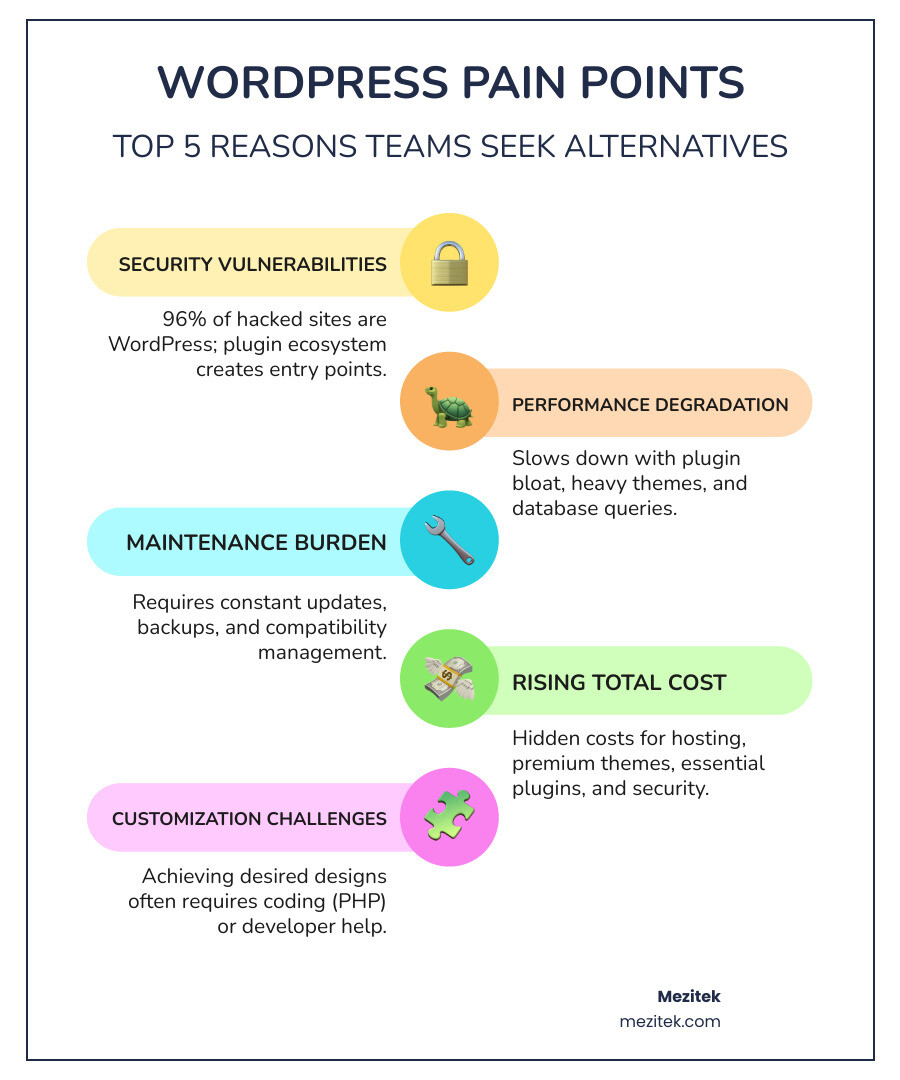
Security is a major concern. Research shows that 96% of hacked websites run on WordPress. Its powerful plugin ecosystem creates countless entry points for attackers, making every new plugin a potential vulnerability.
Performance suffers as sites grow. WordPress sites often face slow site performance under the weight of plugins and database queries, turning simple blogs into maintenance nightmares.
The hidden costs add up. While WordPress is free, the total cost of hosting, premium themes, plugins, and maintenance can spiral quickly for freelancers and small agencies.
Customization hits walls. Achieving a specific design often means diving into PHP or hiring a developer, leading to difficulties with customization. Modern alternatives offer cleaner, visual approaches.
The good news? Today’s alternatives solve these problems while offering features WordPress can’t match. The question isn’t whether alternatives exist—it’s which one fits your needs best.
How to Choose Your Ideal Platform: Key Factors for Success
Choosing the right platform from the many better alternatives to WordPress boils down to a few key factors that align with your project’s goals and your team’s capabilities.
Flexibility & Customization
WordPress offers vast customization but often requires coding skills, leading to “plugin sprawl” and technical debt. When evaluating alternatives, decide if you need a no-code visual builder (like Webflow or Wix) or deep, code-level control for enterprise solutions (like Drupal). API-first platforms like Hygraph offer maximum flexibility for how content is displayed across channels.
Scalability for Growth
Your website must scale with your business. WordPress can struggle, requiring expensive hosting and optimization. Modern alternatives are built for growth. Headless CMS platforms (like Hygraph) and e-commerce giants (like Shopify) are designed to handle high traffic and large content volumes efficiently. For complex, content-heavy sites, Drupal is a celebrated option.
Security
WordPress security is a major concern, as its open-source nature and plugin ecosystem make you responsible for protection. SaaS platforms (Wix, Shopify) handle security for you. Headless CMS solutions improve security by decoupling the frontend and backend, reducing the attack surface. Other options like Drupal and flat-file systems (Kirby, Statamic) are known for being “very secure” due to their architecture.
Performance & SEO
Slow performance from plugins and heavy themes is a common WordPress complaint. Modern alternatives are engineered for speed. Ghost is reportedly “678% faster than WordPress,” and Static Site Generators (SSGs) like Astro are inherently fast. Many alternatives also offer “built-in SEO tools” without needing plugins. Webflow and HubSpot CMS have integrated SEO features, while headless platforms allow developers to optimize for “peak performance and SEO.”
Ease of Use vs. Control
This is the biggest trade-off. For ease of use, drag-and-drop builders like Wix and Squarespace are “user-friendly for beginners.” Webflow offers more visual control without code. For deep control, open-source platforms like Drupal and Joomla are “suited for developers” but have a steeper learning curve. Headless CMS gives developers ultimate control. You must weigh simplicity against granular control.
Total Cost of Ownership
WordPress is “free to use,” but its “total cost of ownership” can be high due to hosting, themes, and plugins. SaaS alternatives (Wix, Shopify) offer predictable subscriptions that include hosting. Open-source options (Drupal, Joomla) are free software but require you to pay for hosting and development. Others like Kirby have a “one-time licensing fee.” Look beyond the sticker price to understand the full cost.
Hosting, Themes, and Plugins
With WordPress, you manage your own hosting, themes, and plugins. This offers flexibility but also adds responsibility for maintenance, security, and performance.
Many modern alternatives simplify this:
-
Hosting: SaaS platforms like Wix, Squarespace, and Shopify “include hosting as part of their service,” handling server management and security for you. Open-source options like Drupal require you to manage your own hosting. For guidance, see our article on How to Choose a Host for Your Website.
-
Themes: Instead of WordPress’s vast but sometimes inconsistent theme library, alternatives offer curated, professional templates. Wix has “900+ website templates,” Squarespace is known for its beautiful designs, and Webflow provides immense design freedom with full code customization.
-
Plugins: WordPress’s reliance on plugins can cause security and performance issues. Many alternatives reduce this by offering more built-in features or curated app marketplaces. Shopify has “8,000 third-party apps” for e-commerce, while headless CMS platforms use APIs for custom integrations, offering more control and stability. To learn more, explore our guide: What is a CMS? Content Management Systems Explained.
The Best WordPress Alternatives for Small Businesses & Freelancers
For many freelancers and small business owners, the goal is a professional website without the steep learning curve or constant upkeep of WordPress. This section categorizes top approaches to help you find the perfect fit.
For Ultimate Ease of Use: All-in-One Website Solutions
These platforms handle hosting, security, and updates, so you can focus on your business. They are ideal for beginners who want to get online fast without touching code.
Wix is a cloud-based, drag-and-drop builder that’s “easy for anyone to create a siteno coding required.” With “900+ website templates” and an AI builder, it’s ideal for non-technical users.
Squarespace is known for its “clean, professional templates and all-in-one approach.” It’s a favorite among creatives for “building visually polished sites quickly” without code, using its drag-and-drop editor and “180 templates.”
Webflow is a “visual web design platform” that bridges the gap between no-code and full customization. It empowers designers to build custom, responsive sites visually, while still allowing for code access. Its growing popularity is shown by a market share increase of “over 13% in the past three years.”
Other options include Framer (AI design), Yola (simple block-based builder), and Google Sites (a free, simple option integrated with Google services).
Pros: Fast setup, beautiful templates, hosting and security included, no technical maintenance.
Cons: Less customization freedom compared to code-based solutions, potential vendor lock-in, and sometimes performance can be a concern with very large sites.
For more detailed guidance, explore Mezitek’s recommended solutions and guides.
For Selling Online: E-commerce Capabilities
If your primary goal is to sell online, a dedicated e-commerce platform is often a better alternative to WordPress with WooCommerce. These are built from the ground up for selling.
Shopify is the leader in this space, powering “over 4.5 million live websites.” It’s “built specifically for e-commerce,” providing tools for inventory, payments, and “multiple sales channels” (Instagram, TikTok, etc.). With “over 8,000 third-party apps,” it’s a user-friendly choice for businesses of all sizes.
Adobe Commerce (formerly Magento) is a powerful, open-source CMS for large-scale e-commerce stores. It offers “extensive customization and scalability” but requires significant technical expertise.
BigCommerce is a flexible platform for businesses of all sizes, offering multi-storefront management and omnichannel support. Its “customizable APIs” make it a strong choice for both traditional and headless commerce.
Even platforms like Squarespace offer robust e-commerce features, making it a viable option for selling digital goods, services, or a smaller product catalog.
Pros: Powerful sales tools, scalable, large app ecosystem, integrated payment processing, multi-channel selling.
Cons: Can be overkill for non-e-commerce sites, transaction fees can add up, and some platforms have a steeper learning curve or higher cost for advanced features.
Dive deeper into our e-commerce resources and platform recommendations at Mezitek’s e-commerce resources and platform recommendations.
For Content Creators & Publishers: Modern Content Platforms
For writers and bloggers, the ideal platform provides a clean writing experience and tools for audience engagement.
Ghost is a “content-focused platform built specifically for publishing.” It offers a clean, fast writing experience with “built-in newsletters” and “paid subscriptions” for monetization. It’s also known for its speed, reportedly being “678% faster than WordPress.”
Medium is a publishing platform, not a full CMS, that’s “minimal, clean, and completely focused on the content.” It’s great for writers who want to reach a built-in audience without any technical overhead.
Blogger and Tumblr are simpler, free platforms for basic blogging and social sharing.
Pros: Clean interface, excellent for blogging, built-in SEO and social sharing features, integrated monetization tools (for platforms like Ghost).
Cons: Less versatile for complex site layouts or custom design, can be pricier for advanced features or self-hosting (for Ghost Pro).
Explore more content publishing solutions at Mezitek’s content publishing solutions.
For Developers & Advanced Users: The Future of CMS
For those with technical skill or a desire for ultimate control, the landscape of better alternatives to WordPress offers powerful and flexible options. For more cutting-edge insights, check out our Innovative Web Solutions.
Monolithic vs. Headless CMS Explained
Understanding the difference between monolithic and headless architectures is key to understanding modern CMS alternatives:
-
Monolithic CMS: This is the traditional, all-in-one model of WordPress, where the backend (content) and frontend (display) are tightly coupled. While simpler to start, this can lead to performance issues and customization difficulties.
-
Headless CMS: This modern approach “separates the backend (content repository) from the frontend (presentation layer).” Content is delivered via API to any channel (website, app, etc.), offering immense flexibility and performance.
The advantages of a headless approach are significant:
- Omnichannel Content Delivery: Reuse content across websites, mobile apps, and more from a single source.
- Improved Security: Separating the frontend reduces the attack surface on the backend.
- Future-Proofing: Update your frontend technology without rebuilding your content backend.
- Developer Freedom: Developers can use their preferred frontend tools and frameworks.
The Power of Flexibility: Visual Development & Headless CMS
This category offers powerful visual design tools and the API-first flexibility of headless architecture.
Webflow is a “design-first CMS that bridges the gap between visual website builders and web development tools.” It gives designers powerful “visual design control” while still allowing developers code access when needed.
For pure headless solutions, we look at platforms like:
- Sanity: A “content operating system” with a composable architecture for distributing content across various touchpoints. It’s known for real-time collaboration and flexible querying with “GraphQL and GROQ.”
- Hygraph (formerly GraphCMS): A GraphQL-native headless CMS designed to solve WordPress’s limitations in scalability and content delivery. It excels at unifying content from multiple sources.
- Contentful: A popular headless CMS focused on ‘composable content’ for creating omnichannel experiences.
- Strapi: An “open-source headless CMS” that works with modern development stacks, offering both RESTful and GraphQL APIs.
- Prismic: A headless CMS that uses reusable content components called “slices” to empower marketing teams.
These platforms provide developers with immense power to build highly customized, performant, and scalable digital experiences. For more resources, explore Mezitek’s guides to headless CMS and visual development.
The Simplicity of Files: Open-Source & Flat-File Options
Flat-file CMS platforms offer a refreshing alternative to database-driven systems like WordPress.
Flat-file CMS advantages are compelling: they use folders and files instead of a database, making them “fast, light weight, and very secure.” Content is easy to edit, back up, and version control with Git.
Here are some notable options:
- Kirby: A lightweight, secure, and flexible PHP-based flat-file CMS celebrated for its great design and simplicity. It requires a “one-time licensing fee.”
- Statamic: A robust flat-file CMS “built on Laravel and powered by Git.” It offers a comprehensive control panel, making it a powerful, developer-friendly option.
- Grav: A fast, flexible, and open-source flat-file CMS with a powerful templating engine.
- Bludit: A simple and straightforward flat-file CMS, ideal for smaller sites.
- Static Site Generators (SSGs) like Astro, Hugo, and Jekyll: These tools generate static HTML pages, resulting in incredibly fast and secure websites. Astro is noted for its flexibility in mixing static and dynamic content.
These platforms offer the benefits of “open-source” software with strong community support, representing a truly “lightweight alternative” to WordPress. For more on this, read our dedicated guide: WordPress Lightweight Alternative.
Frequently Asked Questions about Better Alternatives to WordPress
Here, we address some of the most common concerns about switching from WordPress.
What are the main trade-offs when switching from WordPress?
Switching platforms is a significant decision with several trade-offs:
- Content Migration: Moving content can be labor-intensive and often “requires manual effort.”
- Learning Curve: Every new platform has its own interface and workflow.
- Smaller Ecosystems: Alternatives have smaller plugin/theme marketplaces, which may require custom solutions.
- Initial Costs: SaaS platforms may have higher upfront monthly fees than basic WordPress hosting, though they can offer better long-term value.
- Community Size: While many alternatives have active communities, they are smaller than WordPress’s massive global support network.
Which WordPress alternative is best for SEO out-of-the-box?
Many modern platforms offer excellent built-in SEO capabilities, often surpassing WordPress’s default settings.
- Webflow is often cited as a top contender with “SEO coming built-in, not bolted on,” including clean code and strong tools.
- Ghost is excellent for content sites due to its lean architecture and “built-in SEO/social sharing features.”
- HubSpot CMS is built for marketers with integrated “SEO tools, and analytics.”
- Headless CMS give developers complete control to carefully optimize the frontend for “peak performance and SEO.”
Are there any good free alternatives to WordPress?
Yes. Many robust options are free to use, though you may need to pay for hosting.
- Open-Source CMS: Drupal and Joomla are “completely free” to download and use on your own hosting.
- Self-Hosted Ghost: The core Ghost platform is “free and open source” to install on your own server.
- Google Sites: A completely “free” and simple website builder.
- Limited Free Plans: Many builders like Webflow, Wix, and HubSpot CMS Hub offer free tiers, usually with platform branding and feature limitations.
Conclusion: Making Your Escape and Finding the Right Fit
The journey to find better alternatives to WordPress is less about abandoning a popular platform and more about finding the perfect tool for your specific needs. WordPress’s dominance is undeniable, but its inherent complexities, security challenges, and performance bottlenecks often lead teams to seek more custom solutions.
We’ve explored a wide array of options, from user-friendly drag-and-drop builders to powerful headless CMS and minimalist flat-file systems. The “best” alternative depends entirely on your goals, budget, and technical comfort level.
- For ultimate ease of use and a fast launch, choose an all-in-one builder like Wix or Squarespace.
- For selling online, pick a dedicated e-commerce platform like Shopify or BigCommerce.
- For content creators and publishers, Ghost or Medium offer a focused and efficient experience.
- For ultimate control, scalability, and modern development practices, explore headless CMS platforms like Sanity, Hygraph, or Webflow.
- For developers seeking simplicity and control over their file system, flat-file CMS like Kirby or Statamic are excellent choices.
At Mezitek, we empower freelancers and small businesses to build better websites by choosing the right tools for the job. We believe that by understanding your project’s unique requirements and the capabilities of these diverse platforms, you can make a confident escape from WordPress’s limitations and build a digital presence that truly thrives.
Explore our guides on Content Management Systems to continue your journey!