Why WordPress Might Be Slowing You Down
WordPress lightweight alternative platforms offer faster performance, better security, and simpler maintenance than traditional WordPress installations. Here are your top options:
Best Flat-File CMS Alternatives:
- Grav – Feature-rich with powerful caching and extensive plugins
- GetSimple CMS – Ultra-simple with 5-minute setup and XML storage
- Bludit – Fast JSON-based system with built-in SEO tools
Best Static Site Generators:
- Jekyll – Blog-focused, powers GitHub Pages
- Hugo – Blazing fast build times, great for large sites
WordPress powers 43.3% of all websites, but here’s the uncomfortable truth: 96% of hacked websites run on WordPress. Beyond security concerns, WordPress can feel like overkill for many projects—slow performance from database queries, constant plugin updates, and complexity you simply don’t need.
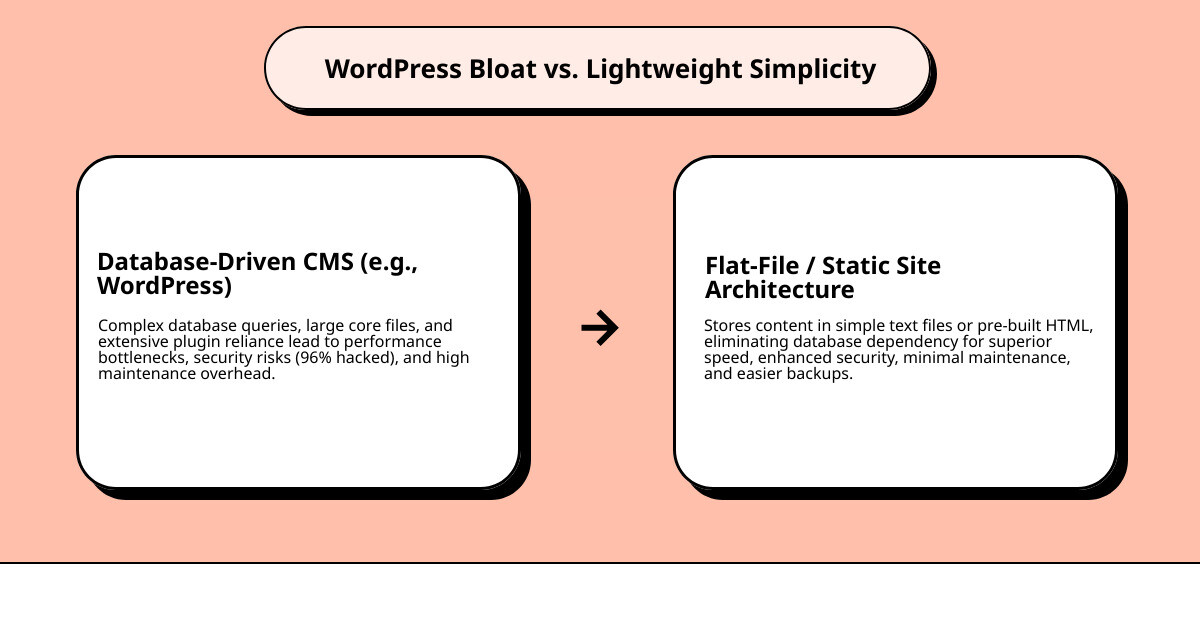
A lightweight alternative strips away the bloat. Instead of WordPress’s database-driven architecture (around 55MB of core files), these platforms use flat files or pre-built HTML to deliver your content. The result? Faster load times, fewer security vulnerabilities, and way less maintenance headache.
What makes a CMS “lightweight”?
- No database dependency (flat-file storage)
- Minimal core files and code
- Reduced server resource usage
- Simpler backup and version control
There are two main categories to consider: Flat-file CMS platforms (like Grav and Bludit) that store content in text files instead of databases, and Static Site Generators (like Jekyll and Hugo) that build your entire site as static HTML files. Both approaches eliminate WordPress’s performance bottlenecks while giving you back control.
For freelancers and small agencies, these lightweight options mean faster client sites, easier maintenance, and fewer late-night emergency calls about security patches.
Why Ditch the Bloat? The Core Drawbacks of WordPress
For years, WordPress has been the undisputed king of content management systems. And for good reason—it’s powerful, versatile, and has an ecosystem of plugins and themes that can build almost anything. But for many of us, especially low-code freelancers and small business owners, WordPress often brings more headaches than it’s worth. We’ve seen it firsthand: the very features that make WordPress so powerful can also be its biggest drawbacks.
The primary reasons users like us seek alternatives often boil down to a few critical areas:
Performance Bottlenecks
Let’s be honest, we’ve all experienced a slow WordPress site. The main culprit? Its database-driven architecture. Every time someone visits a page, WordPress has to query a database to fetch content, process PHP scripts, and load numerous plugins. This constant back-and-forth adds precious seconds to load times. While caching can help, it’s a band-aid solution to an inherent architectural challenge. For a freelancer trying to deliver a snappy website to a client, or a small business owner wanting to ensure their online store loads instantly, these delays are simply unacceptable.
Security Risks
This is perhaps the most glaring issue. The statistic is chilling: 96% of hacked websites run on WordPress. While WordPress core itself is relatively secure, its massive popularity makes it a prime target for attackers. The sheer volume of third-party themes and plugins, many of which are poorly coded or not regularly updated, introduce countless vulnerabilities. For us, managing client sites, this translates to constant vigilance, emergency patching, and the ever-present fear of a breach. It’s a significant time drain and a source of stress that a wordpress lightweight alternative can largely mitigate.
Maintenance Overload
Remember the last time you logged into a WordPress dashboard only to find a dozen updates pending for themes, plugins, and the core system itself? It’s a common scenario. These updates are crucial for security and functionality, but they’re also a massive time sink. And let’s not even talk about plugin conflicts! One update can break another plugin, or even the entire site, leading to frantic troubleshooting. For a low-code freelancer or a small business owner, this means less time focusing on creative work or growing their business, and more time wrestling with website upkeep.
Unnecessary Complexity for Simple Sites
WordPress started as a blogging platform and evolved into a full-fledged CMS. But for a simple blog, a portfolio, or a small informational website, its robust features are often overkill. The database, the extensive admin interface, the block editor (Gutenberg)—they all add layers of complexity that many projects simply don’t need. This can make the learning curve steeper for beginners and slow down development for those who just want to get a simple site up quickly and efficiently. We believe that choosing the right tool for the job means not picking a sledgehammer when all you need is a tack hammer.
Understanding What is a CMS? Content Management Systems Explained can help clarify why some systems are better suited for specific needs than others.
Your Top WordPress Lightweight Alternative: Flat-File CMS vs. SSGs
When we talk about a wordpress lightweight alternative, we’re essentially talking about systems that strip away the traditional database and much of the runtime processing that makes WordPress, well, WordPress. These alternatives redefine what a content management system can be, focusing on efficiency, speed, and security.
What Defines a ‘Lightweight’ Alternative?
A truly ‘lightweight’ CMS is characterized by:
- No Database Dependency: This is the big one. Instead of MySQL or PostgreSQL, content is stored directly in files (like Markdown, JSON, or XML). This eliminates database queries, making sites inherently faster.
- Minimal Core Files and Code: Less code means less to process, less to break, and a smaller attack surface for security vulnerabilities.
- Reduced Server Resource Usage: Without a database, these systems demand less CPU and memory from your server, leading to lower hosting costs and better performance, even on shared hosting.
- Simpler Backup and Version Control: Since everything is file-based, backing up a site is often as simple as copying a folder. Version control systems like Git become incredibly powerful for tracking content changes.
Main Categories of WordPress Alternatives
We primarily categorize these wordpress lightweight alternative solutions into two camps: Flat-File CMS and Static Site Generators. They both avoid databases but differ significantly in how they deliver content.
Explaining Flat-File CMS
Imagine your website’s content living directly in easy-to-read text files and folders on your server, rather than tucked away in a complex database. That’s the essence of a flat-file CMS. When a user requests a page, the server reads these files directly, processes them through minimal PHP (or another language), and renders the HTML.
Advantages:
- Performance: Eliminates database queries, leading to faster content retrieval.
- Ease of Management: Content is often in Markdown, making it easy to edit directly or via a simple admin panel.
- Portability & Backups: The entire site is just a collection of files, making it incredibly easy to back up, move, and deploy.
- Version Control with Git: Because content is file-based, you can use Git to track every change, revert to previous versions, and collaborate seamlessly—a huge win for developers and organized freelancers.
Explaining Static Site Generators (SSGs)
Static Site Generators take the concept of lightweight to its extreme. Instead of building pages on the fly when a user visits, SSGs do all the heavy lifting before the site is deployed. You write your content in Markdown (or another simple format), choose a template, and the SSG processes everything into plain, pre-built HTML, CSS, and JavaScript files. What gets uploaded to the server is just these static files, ready to be served directly to the browser.
Advantages:
- Unbeatable Speed: Since there’s no processing happening on the server side when a user visits, static sites load almost instantaneously.
- Top-Tier Security: No database, no server-side processing, no dynamic components means virtually no attack surface for hackers.
- Simplicity: Once generated, the site is just a collection of files. Hosting is incredibly simple and cheap.
- Scalability: Static sites can handle massive traffic spikes without breaking a sweat, as they’re just serving files.
Here’s a quick comparison to help us visualize the differences:
| Feature | WordPress (Database-Driven CMS) | Flat-File CMS (e.g., Grav) | Static Site Generators (e.g., Hugo) |
|---|---|---|---|
| Performance | Moderate (Database queries, PHP processing) | High (No database queries, minimal PHP) | Extremely High (Pre-built HTML) |
| Security | Moderate (High attack surface due to database, plugins) | High (No database, smaller attack surface) | Very High (No server-side processing, no database) |
| Ease of Use | High (Visual editor, comprehensive admin) | Moderate to High (Admin panel, Markdown) | Moderate to Low (Code editor, command line) |
| Flexibility | Very High (Plugins, themes, dynamic content) | High (Plugins, themes, some dynamic content) | Moderate (Pre-built, dynamic content via third-party JS) |
| Maintenance | High (Updates, backups, security patches) | Moderate (Updates, file backups) | Low (Re-generate, deploy static files) |
Database-Free Simplicity: Our Top Flat-File CMS Picks
For those of us who appreciate a good admin panel but want to ditch the database drama, flat-file CMS solutions are a fantastic middle ground. They offer a user-friendly backend experience similar to WordPress, but with all the speed and security benefits of a file-based system. This makes them ideal for freelancers and small business owners who need to manage content efficiently without becoming database experts.
Choosing the right hosting is still crucial, even for lightweight systems. We recommend checking out How to Choose a Host for Your Website to ensure you pick a provider that complements your chosen CMS.
Grav: The Feature-Rich Option
Grav is a modern wordpress lightweight alternative that truly impresses with its blend of power and simplicity. It’s an open-source flat-file CMS that doesn’t skimp on features.
Key Features & Benefits:
- Powerful Caching: Grav leverages robust caching mechanisms to deliver content incredibly fast, often rivaling static sites.
- User-Friendly Admin Panel: It boasts an intuitive and modern admin interface, allowing us to manage content, settings, and plugins without touching any code. This is a huge plus for low-code users.
- Extensive Plugins and Themes: While not as vast as WordPress, Grav has a healthy ecosystem of plugins and themes that extend its functionality for everything from SEO to image optimization.
- Simple File Upload Setup: Content is written in Markdown and stored in a logical folder structure, making it easy to understand and manage.
Comparison to WordPress:
- Ease of Use: Grav’s admin panel is clean and modern, often less overwhelming than WordPress for new users.
- Performance: Significantly faster due to no database queries.
- Security: Reduced attack surface.
- Flexibility: Highly flexible through its plugin architecture, but perhaps not to the “build anything” extent of WordPress.
- Installation & Setup: Simpler than WordPress, often a quick upload and configuration. Content creation is via Markdown in the admin or directly in files. Customization is theme-based.
Trade-offs: Less community support than WordPress, and finding niche plugins might be harder.
Suitable for: Users wanting a powerful system without a database, complex blogs, marketing sites, and small business websites that need good performance and a manageable backend.
GetSimple CMS: Simplicity at its Core
If “minimal fuss” is your mantra, then GetSimple CMS is your champion. This wordpress lightweight alternative is designed for extreme simplicity and efficiency, making it perfect for smaller projects where you don’t need a mountain of features.
Key Features & Benefits:
- XML-Based Data Storage: Instead of a database, GetSimple stores all its content in XML files. This is incredibly straightforward and easy to understand.
- Extremely Easy to Use: The admin interface is famously simple, making it one of the most beginner-friendly options.
- “Undo” Functionality: A unique feature that allows us to revert changes easily, offering peace of mind.
- 5-Minute Setup Wizard: We can get a site up and running in minutes, which is fantastic for rapid prototyping or quick client projects.
Comparison to WordPress:
- Ease of Use: Far simpler than WordPress, ideal for those who find WordPress overwhelming.
- Performance: Very fast for its target use case, as it avoids database overhead.
- Security: Minimal codebase, file-based, inherently more secure against common database attacks.
- Flexibility: Limited compared to WordPress, focused on core website and blog functionality.
- Installation & Setup: Arguably one of the easiest. Content creation is via a rich text editor in the admin. Customization primarily through themes.
Trade-offs: Limited extensibility, smaller community, and not suitable for complex, dynamic websites.
Suitable for: Small business websites, personal portfolios, simple blogs, and beginners who need a straightforward, easy-to-maintain online presence.
A notable open-source wordpress lightweight alternative: Bludit
Bludit is another excellent wordpress lightweight alternative for those who value speed, simplicity, and privacy. It’s a flat-file CMS that uses JSON files for content, making it incredibly nimble.
Key Features & Benefits:
- Uses JSON Files: Content is stored in JSON files, eliminating the need for a database and contributing to its speed.
- Markdown Support: Bludit fully supports Markdown, which is fantastic for content creators who prefer a clean writing experience.
- Built-in SEO Tools: It comes with essential SEO features out of the box, helping our sites rank better without needing extra plugins.
- GDPR Compliant by Design: Bludit is built with privacy in mind, not tracking users or relying on external resources, which is a significant advantage in today’s privacy-conscious world.
Comparison to WordPress:
- Ease of Use: Simple and straightforward admin panel, less cluttered than WordPress.
- Performance: Very fast due to JSON file storage and minimal processing.
- Security: Small codebase and no database make it very secure.
- Flexibility: Good for blogging and simple content sites, but less adaptable for highly complex web applications.
- Installation & Setup: Easy to install, typically a quick upload to the server. Content creation is via the admin panel with Markdown. Customization is theme-based.
Trade-offs: Smaller community and fewer advanced features compared to more robust CMS options.
Suitable for: Blogs, simple personal websites, and portfolios where speed, privacy, and ease of use are paramount. It’s perfect for those who appreciate a clean, minimalist approach to web publishing.
Maximum Speed & Security: An Intro to Static Site Generators
If your priority is absolute speed, bulletproof security, and you’re comfortable with code, then Static Site Generators (SSGs) are your ultimate wordpress lightweight alternative. SSGs are a different beast entirely. They trade a live server-side environment for pre-generated HTML files, offering unparalleled performance. This approach is particularly appealing to tech-savvy freelancers and developers who prioritize performance and control above all else.
For those looking to dive deeper into how these sites are built, our guide on How to Build a Website can provide valuable insights into the underlying processes.
Jekyll: The Original Blog-Aware SSG
Jekyll holds a special place in the SSG world as one of the pioneers. It’s a Ruby-based SSG that gained massive popularity for powering GitHub Pages, making it an accessible entry point for many developers.
Key Features & Benefits:
- Powers GitHub Pages: This means free hosting and seamless deployment for many personal and project websites.
- Large Community Support: As one of the oldest and most popular SSGs, Jekyll has a vast community, offering plenty of themes, plugins, and help.
- Focus on Blogging and Documentation: Jekyll excels at creating content-heavy sites like blogs, portfolios, and project documentation.
- Content Management via Code Editor and Git: Content is written in Markdown or other plain text formats and managed directly in files, version-controlled with Git.
Comparison to WordPress:
- Ease of Use: Requires comfort with the command line and code editor; no graphical admin panel. Definitely more developer-focused than WordPress.
- Performance: Extremely fast as it serves static files.
- Security: Highly secure due to its static nature.
- Flexibility: Flexible for content structure and templating, but dynamic features require client-side JavaScript.
- Installation & Setup: Involves installing Ruby, Jekyll, and using the command line. Content creation is writing Markdown files. Customization is done by editing templates and CSS.
Trade-offs: Steeper learning curve for non-developers, requires a rebuild and redeploy for every content change, lacks a visual admin interface.
Suitable for: Developers, tech-savvy bloggers, open-source projects, and anyone needing a fast, secure, content-heavy site that can be managed with Git.
Hugo: The Blazing Fast Generator
If Jekyll is the original, Hugo is the speed demon. Written in Go, Hugo is renowned for its incredibly fast build times, making it a favorite for larger static sites with thousands of pages.
Key Features & Benefits:
- Written in Go Language: This is key to its legendary speed. Hugo can build even massive sites in milliseconds.
- Incredibly Fast Build Times: This is its standout feature. For projects with extensive content, Hugo’s speed dramatically reduces development time.
- Flexible Content Types: Hugo allows for highly structured content, making it suitable for more than just blogs, including complex documentation sites, portfolios, and even small e-commerce sites (with third-party integrations).
- Excellent for Multilingual Sites and Large Content Volumes: Its speed and efficient content organization make it a strong choice for sites with diverse content needs.
Comparison to WordPress:
- Ease of Use: Similar to Jekyll, it’s developer-centric, requiring command-line proficiency and comfort with text editors.
- Performance: Arguably the fastest of all wordpress lightweight alternative options discussed, delivering content at lightning speed.
- Security: Inherently secure as it produces static files.
- Flexibility: Very flexible in terms of content structure and templating, with advanced features for organizing content. Dynamic features are handled client-side.
- Installation & Setup: Simple binary installation. Content is written in Markdown and managed via files and Git. Customization is through Go templating and CSS.
Trade-offs: No graphical admin interface, requires a technical mindset, dynamic content needs to be handled via external services or client-side JavaScript.
Suitable for: Developers and technically proficient users building large blogs, documentation sites, corporate websites, or any project where build speed and ultimate performance are paramount.
Frequently Asked Questions about Lightweight WordPress Alternatives
We understand that stepping away from WordPress can feel like a big leap. Here are some common questions we hear from freelancers and small business owners considering a wordpress lightweight alternative.
Are lightweight alternatives good for SEO?
Absolutely, yes! In many ways, they are better for SEO than a typical WordPress site. Here’s why:
- Speed is a Ranking Factor: Search engines like Google prioritize fast-loading websites. Since lightweight alternatives are inherently faster, they often get a natural boost in search rankings.
- Clean Code: SSGs, especially, generate clean, semantic HTML, which is easier for search engine crawlers to understand and index.
- Improved User Experience: Faster load times lead to lower bounce rates and higher engagement, which are positive signals to search engines.
- Security: A secure site is a trustworthy site. Fewer vulnerabilities mean less chance of being penalized by search engines for malware or hacks.
While they might lack the endless SEO plugins of WordPress, their fundamental architectural advantages provide a significant head start. We can still implement all the essential SEO best practices, like meta tags, sitemaps, and structured data.
Can I use a lightweight CMS if I’m not a developer?
Yes, for some of them! This depends heavily on the type of wordpress lightweight alternative you choose:
- Flat-File CMS (like Grav or GetSimple CMS): These are often quite user-friendly. They typically feature an admin panel that allows you to manage content, themes, and plugins without writing a single line of code. If you’re comfortable using a visual interface, you’ll likely find these options very accessible.
- Static Site Generators (like Jekyll or Hugo): These are generally more developer-focused. They require comfort with the command line, Markdown, and potentially some basic templating languages. While the result is easy to manage (just static files), the process of setting them up and updating them is geared towards those with some technical expertise.
So, if you’re not a developer, we’d recommend starting with a flat-file CMS. If you’re eager to learn some basic coding skills, an SSG could be a rewarding challenge!
How do I choose the right wordpress lightweight alternative for my project?
Choosing the perfect wordpress lightweight alternative involves a bit of self-assessment. We suggest considering these factors:
-
Your Technical Skill Level:
- Low-Code/No-Code: Start with flat-file CMS options like Grav, GetSimple CMS, or Bludit. They offer admin interfaces and simpler content management.
- Comfortable with Code/Command Line: Static Site Generators like Jekyll or Hugo will give you ultimate performance and control.
-
Your Need for Dynamic Features:
- Simple Blog/Portfolio/Informational Site: Flat-file CMS or SSGs are perfect. Dynamic comments, contact forms, or e-commerce can often be integrated via third-party services (e.g., Disqus for comments, form services, Snipcart for e-commerce).
- Highly Interactive/User-Generated Content: If your site absolutely needs complex user accounts, forums, or extensive real-time dynamic content without external services, a lightweight alternative might involve more trade-offs, and you might need to consider a different approach.
-
Content Update Frequency:
- Infrequent Updates: SSGs are great. You rebuild and redeploy only when content changes.
- Frequent Updates/Multiple Content Editors: A flat-file CMS with an admin panel might be more convenient, as changes are live immediately (or after a quick cache clear).
-
Scalability and Performance Goals:
- Ultimate Speed & Security: SSGs are best.
- Very Good Speed & Security with Admin Panel: Flat-file CMS offers a strong balance.
By honestly assessing these points, we can narrow down the options and find the wordpress lightweight alternative that best fits your project’s unique requirements and your own comfort level.
Conclusion: Choosing the Right Tool for Your Next Project
We’ve seen that while WordPress is a giant in the CMS world, its inherent drawbacks—performance bottlenecks, significant security risks, and burdensome maintenance—can be a real drain on our time and resources as freelancers and small business owners. The constant cycle of updates, plugin conflicts, and the ever-present threat of being part of that 96% of hacked websites running WordPress can make us question if it’s truly the best tool for every job.
Fortunately, wordpress lightweight alternative options is rich and varied, offering powerful solutions that are faster, more secure, and often simpler to manage. We’ve explored two main categories:
- Flat-file CMS like Grav, GetSimple CMS, and Bludit offer a fantastic balance. They eliminate the database, boosting performance and security, while still providing a familiar admin interface for content management. They are ideal for those who want a user-friendly backend without the bloat.
- Static Site Generators (SSGs) like Jekyll and Hugo push the boundaries of speed and security. By pre-building your entire site into static HTML, they deliver unparalleled performance and minimal attack surface. While they require a more technical approach, the results are incredibly robust and scalable.
The trade-offs involved when choosing a lightweight CMS primarily revolve around features, extensibility, and community support. You might not find a plugin for every conceivable function as you would in WordPress’s vast ecosystem, and the communities, while active, are generally smaller. However, for many projects, this “less is more” approach leads to a cleaner, more efficient, and ultimately more successful website.
For us, the best CMS isn’t the most popular one; it’s the one that perfectly fits the project’s needs. Whether you’re building a simple portfolio, a lightning-fast blog, or a secure informational site, there’s a wordpress lightweight alternative that can help you achieve your goals with less hassle and more confidence. Making smart choices about our tools allows us to focus on what we do best: designing, building, and managing effective websites for our clients and our businesses.
Ready to explore more? Dive into our resources to Explore more Content Management Systems and find the perfect fit for your next project.