
Why Dynamic Website Builders Are Changing the Game
A dynamic website builder is a platform that lets you create websites that generate content in real-time, respond to user interactions, and personalize experiences—all without writing complex code. By combining visual editors, integrated databases, and content management systems, these tools help you build sophisticated sites that adapt to each visitor.
Key capabilities of dynamic website builders:
- Real-time content generation – Pages are created on-the-fly based on database queries.
- Visual development – Drag-and-drop interfaces eliminate the need for manual coding.
- Integrated CMS – Built-in content management for easy updates.
- User personalization – Display different content based on user behavior or login status.
- Database connectivity – Connect to data sources without backend code.
- AI assistance – Generate layouts, content, and code snippets automatically.
The web has evolved far beyond static HTML pages. Brands are rapidly adopting these builders to create experiences that respond to users in real-time.
For freelancers and small agencies, this shift is massive. You can deliver complex functionality—e-commerce stores, membership portals, personalized news feeds—without a full development team. As one creative business owner put it: dynamic builders have become “an escape from being dependent on other professionals.”
These platforms abstract away technical complexity, handling the frontend, backend, and database through visual tools. You can focus on design and content strategy while the builder handles the code.
This matters because clients expect websites that do things: remember shopping cart items, update news feeds automatically, and display personalized data. Static sites can’t deliver that, but dynamic builders can, making professional results achievable without a computer science degree.
Understanding the Core of Dynamic Websites
At its heart, a dynamic website is a marvel of interconnected technologies. Modern dynamic website builder tools simplify this ecosystem, making it accessible to everyone.

To understand a dynamic website builder, let’s look at the core components of a dynamic website:
- Frontend Technologies: This is everything a user sees and interacts with in their browser.
- HTML (HyperText Markup Language): The skeleton that structures a webpage.
- CSS (Cascading Style Sheets): The skin, dictating how HTML elements look (colors, fonts, layout).
- JavaScript: The brains of the page, adding interactivity, animations, and real-time content updates.
- Backend Technologies: This is the server-side logic that users don’t see.
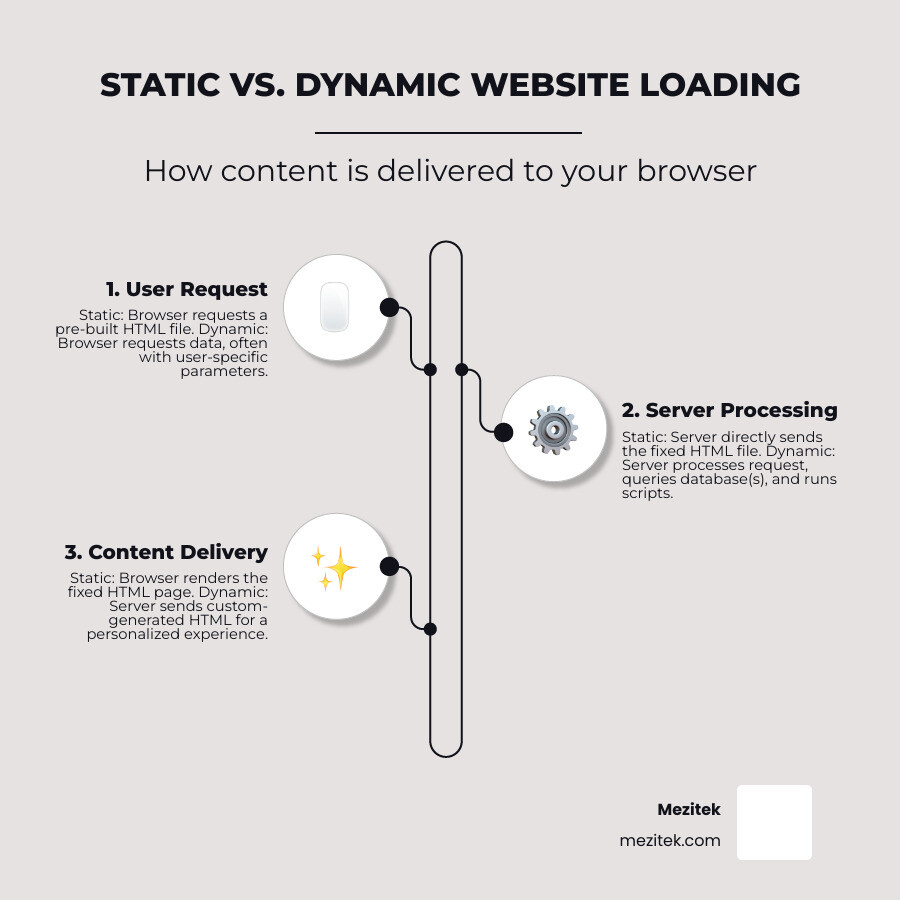
- Server-side Processing: Instead of sending a pre-made file, the server runs code to generate a page on the fly, processing user input and querying databases for custom information.
- Databases: The website’s long-term memory, storing user profiles, products, blog posts, and more.
- How Builders Abstract Complexity: A dynamic website builder handles the underlying code for you. It provides visual interfaces and drag-and-drop elements, allowing you to focus on design and user experience instead of server configurations or database queries.
For a deeper dive into how these components fit together, check out our guide on More info about website architecture.
Static vs. Dynamic: A Clear Distinction
The difference lies in how and when content is generated.
-
Static Sites:
- Pre-built Files: Each page is a fixed HTML file stored on a server.
- Faster Loading: The server sends the ready-made file directly, resulting in very fast load times.
- Limited Interaction: Content is the same for every visitor until a developer manually updates the files. Great for portfolios or simple informational sites.
-
Dynamic Sites:
- Generated On-the-Fly: When a user requests a page, the server actively processes the request, checking who the user is or what’s in stock.
- Database Queries: The server queries a database to fetch relevant content, like product details or the latest articles.
- User-Specific Content: The content is assembled in real-time, allowing for personalized dashboards, shopping carts, and search results.
If your website needs to respond to user input or display changing information, it needs to be dynamic. This is why a dynamic website builder is a game-changer.
Key Technologies Involved
While a dynamic website builder abstracts away complexity, it’s helpful to know the technologies they leverage.
- Server-side Languages: Languages like Python, Node.js, and PHP are used for backend logic, processing forms, and managing user sessions.
- Client-side Scripts: Primarily JavaScript, these scripts run in the user’s browser to add interactivity and fetch data without full page reloads.
- Content Management Systems (CMS): A core component for managing content (text, images) without code. Modern builders have a highly integrated CMS.
- APIs (Application Programming Interfaces): APIs are rules that let different software applications communicate. Dynamic sites use them to integrate with external services like payment gateways or social media. Builders simplify connecting to popular APIs.
- Managed Hosting Environments: Builders typically include managed hosting with global CDNs and security features, taking the burden of server management off your shoulders.
Key Features to Look for in a Dynamic Website Builder
Choosing the right dynamic website builder is crucial. It’s about functionality, flexibility, and future-proofing your projects. Here are the key features to look for:
- Ease of Use: The tool should be intuitive, allowing you to spend more time creating and less time troubleshooting.
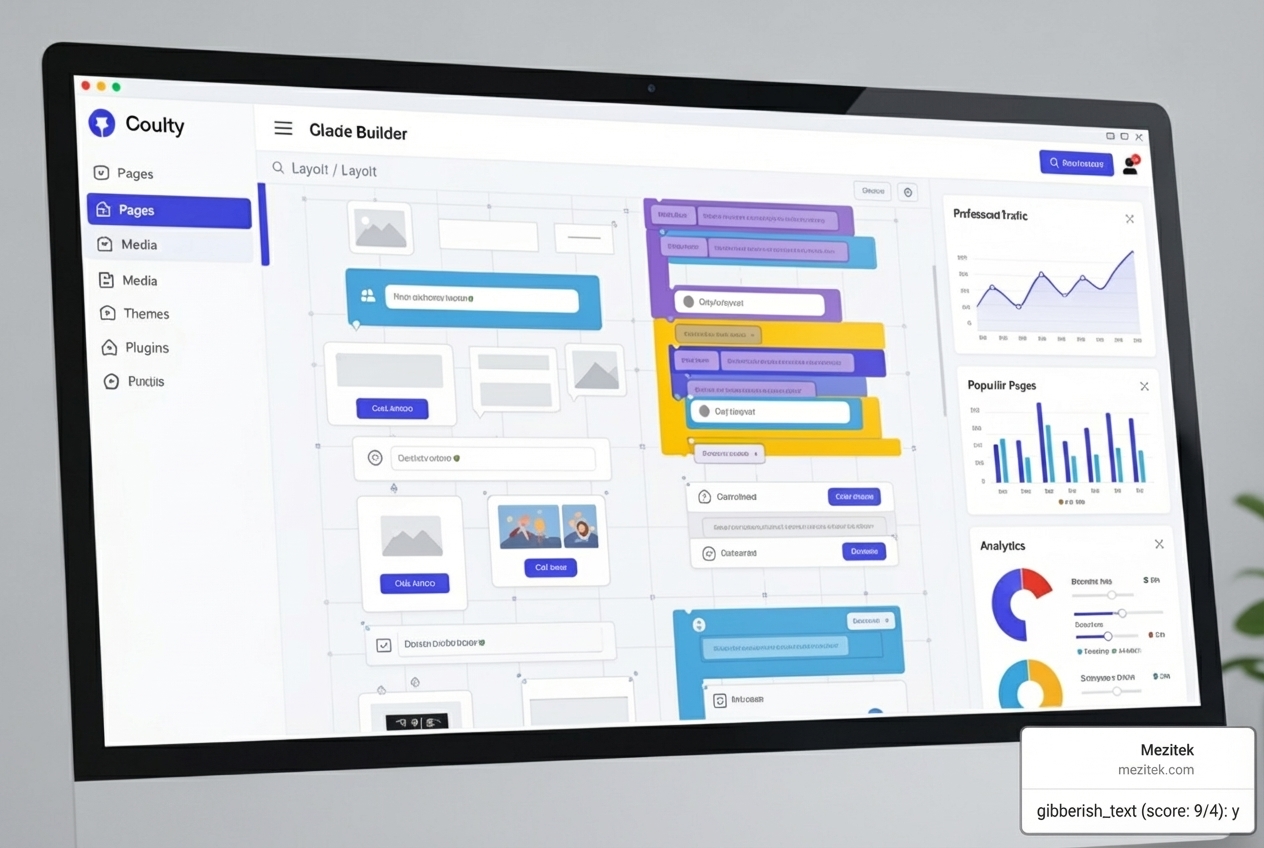
- Visual Editor: A powerful drag-and-drop interface should offer precise control over layouts, styles, and interactions, giving you the “full power of CSS in a visual tool” without writing code.
- Customization Options: Look for builders that allow extensive template customization and support custom code if needed, ensuring you’re not limited by default settings.
- Scalability: The builder should handle increasing traffic, larger databases, and more complex features as your client’s business grows.
- Integrations: Seamless connections to marketing tools, payment systems, and other third-party services are essential for building versatile websites.
- Collaboration Features: For teams, features like roles, permissions, and version control are invaluable for smooth teamwork.
Here’s a quick overview of how different aspects of a dynamic website builder can compare:
| Feature Category | Builder Approach 1 (e.g., Visual-first) | Builder Approach 2 (e.g., AI-driven) | Builder Approach 3 (e.g., Developer-friendly No-code) |
|---|---|---|---|
| CMS Capabilities | Visual, composable CMS; content modeling | AI-generated content structures | Headless CMS; API-first content |
| AI Tools | AI Assistant for design & content | AI Site Planner, code assistant, image gen | AI for code generation and component creation |
| SEO Control | Machine-readable schema, IndexNow, meta tags | AI-driven AEO, content optimization | Granular control, custom redirects |
| Collaboration | Real-time editing, roles & permissions | Automated content generation, simplified handoffs | Component registration, developer-designer workflow |
| Customization | Full CSS control, custom blocks | Prompt-based generation, limited custom code | Open architecture, integrate arbitrary code |
| Scalability | Managed hosting, CDN, enterprise features | Cloud-based, adaptable to traffic spikes | Static builds, clean code generation |
How a Dynamic Website Builder Handles Content
A robust Content Management System (CMS) is the backbone of a dynamic website. In a dynamic website builder, the CMS is deeply integrated into the building process.
- Integrated CMS: The CMS is built-in, creating a cohesive system for your content, design, and database.
- Content Modeling: This feature lets you define the structure of your content. For a blog, you might create a “Post” type with fields for Title, Author, and Date. This flexibility allows you to “build your own CMS” custom to your project’s needs.
- Defining Fields: You can choose from various field types—text, images, numbers, dates, and references to other content—to ensure your content is structured perfectly.
- On-page Editing: Many builders allow you to edit content directly on the live webpage. This “write and edit—right on the page” capability provides immediate visual feedback, making content updates intuitive.
Understanding the role of a CMS is fundamental. For more insights, explore our article on What is a CMS? Content Management Systems Explained. These features are also vital for Efficient team collaboration.
The Power of AI Integration
Artificial Intelligence is revolutionizing how we build dynamic websites. Modern dynamic website builder tools are integrating AI to make our work easier and our websites smarter.
- AI Site Planner: Some builders can take a simple project description and generate a sitemap and wireframes, turning a vague vision into a concrete plan in minutes.
- AI-Generated Content: AI can help write compelling copy for webpages, product descriptions, or blog posts, ensuring consistent brand messaging.
- AI Image Creation: AI image generators can create unique visuals from text prompts, saving you from stock photo budgets.
- Personalization: AI analyzes user behavior to deliver custom experiences, such as personalized product recommendations or news feeds. Some platforms offer “AI-powered personalization” to optimize conversions.
- AI Code Assistants: Even in low-code environments, AI can help write, explain, or debug code snippets, empowering you to add custom features without being a full-stack developer.
To explore more about how AI is changing web design, check out our guide on Best AI Tools for Web Designers.
Using a Dynamic Website Builder for SEO and AEO
Being found online is paramount. Dynamic website builder tools are designed with search engine optimization (SEO) and AI-driven search (AEO) in mind.
- Schema Markup: Builders often add machine-readable schema automatically, helping search engines understand and index your content for rich search results.
- Server-side Code: The clean, server-side code generated by good builders is optimized for search engines, ensuring proper indexing and ranking.
- IndexNow Support: Some builders offer automatic IndexNow support, which instantly notifies search engines of content updates for faster indexing.
- Meta Tag Control: Builders provide intuitive interfaces to manage meta titles and descriptions for every page and dynamic item, even generating them dynamically for content collections.
- AI Experience Optimization (AEO): This focuses on optimizing for AI-driven search. Builders with AI personalization tools contribute to AEO by delivering highly relevant content, which AI algorithms value.
- Clean URLs: Dynamic builders typically generate clean, human-readable URLs that are better for users and SEO.
How to Build Your Dynamic Website Step-by-Step
Building a dynamic website is an intuitive process with the right dynamic website builder. Let’s walk through how to turn your vision into a live, interactive site. For a general overview, see our guide on How to Build a Website.
Here’s a list of website types that are particularly well-suited for dynamic website builders:
- E-commerce Stores: Shops with product listings, shopping carts, and customer accounts.
- News and Media Portals: Sites with constantly updated articles, videos, and personalized feeds.
- Social Media Platforms: Sites with user-generated content, profiles, and interactive feeds.
- Online Forums and Communities: Platforms for discussions, user reputation, and moderation.
- Membership Sites: Websites offering exclusive content to registered users.
- Booking Systems: Platforms for scheduling appointments, reservations, or events.
- Job Boards or Directories: Sites with frequently updated listings for jobs, businesses, or properties.
- Portfolios with CMS: Creative portfolios where projects are managed through a CMS.
Step 1: Define Your Project and Choose a Tool
Clarity is key before you start building.
- Identify Goals: What should your website achieve? Selling products, sharing information, or building a community?
- List Required Features: Brainstorm all necessary functionalities, such as user logins, a blog, an online store, or a booking system.
- Consider Your Technical Skill Level: Be honest about your comfort with technical concepts, as some builders offer more granular control than others.
- Evaluate Pricing and Support: Compare pricing tiers and understand what’s included (hosting, features) and what support is available.
Step 2: Structure Your Content
This is where you organize the information that will power your dynamic pages.
- Plan Your Content Types: Based on your goals, determine your content categories (e.g., “Products,” “Posts,” “Authors”).
- Use the CMS to Create Collections: In your builder, create “collections” for each content type. These act as folders for similar items.
- Define Custom Fields: For each collection, define the fields that make up an item (e.g., a “Product” has fields for Name, Price, and Description).
- Prepare for Dynamic Data: Think about how content items relate. For example, a “Post” might “reference” an “Author,” which is key for interconnected experiences.
Step 3: Design, Build, and Launch
Now it’s time to bring your dynamic website to life visually.
- Choose a Template or Start Blank: Use a pre-designed template to get a head start, or begin with a blank canvas for a completely custom vision.
- Design with the Visual Editor: Use the drag-and-drop interface to add sections and elements. Good builders offer visual control over CSS properties for responsive design without code.
- Connect Design Elements to CMS Data: This is the core of dynamic building. Instead of adding content manually, you “bind” design elements to your CMS data. For instance, connect a product card’s title, price, and image fields to your “Products” collection. The builder then automatically generates a card for every product in your database.
- Publish Your Site: With a few clicks, your dynamic website builder will deploy your site to its managed hosting environment, making it live.
Step 4: Ensure Performance, Security, and Scalability
A great dynamic website is performant, secure, and scalable. Good dynamic website builder platforms prioritize these aspects.
- Managed Hosting: Most builders include managed hosting, handling server infrastructure, maintenance, and uptime.
- Global CDN (Content Delivery Network): CDNs ensure fast page loads for users worldwide by storing assets on servers closer to them.
- SSL Certificates: Builders typically provide free, automatic SSL certificates to encrypt data and build user trust (HTTPS).
- Automatic Backups: A reliable builder offers automatic backups, allowing you to restore your site to a previous version if needed.
- Scalability Features: Builders are designed to handle traffic spikes, ensuring your site remains performant even during peak periods.
For more on choosing the right hosting, read our guide on How to Choose a Host for Your Website. For security insights, check out Managed security and site backups.
Navigating Limitations and Future Trends
While dynamic website builder tools are powerful, it’s wise to understand their limitations and watch future trends.
Potential Drawbacks
- Vendor Lock-in: Migrating a complex dynamic site between builders can be difficult, even with platforms that claim “open architecture.” The unique structure of each builder’s CMS and code can complicate the process.
- Performance Constraints: For extremely large-scale applications, a custom-coded solution might eventually outperform a builder. However, this is rarely an issue for most small businesses and freelancers.
- Learning Curve for Advanced Features: While basic use is easy, mastering advanced dynamic features or complex content modeling can require a learning investment.
- Cost: Free plans are a great start, but scaling up with more features and traffic requires paid plans, which can be a recurring cost.
Future of Building
The landscape of dynamic website builder tools is constantly evolving, driven by AI and emerging technologies.
- Composable Architecture: The trend is toward composable systems, where you can integrate best-of-breed services (CMS, e-commerce, analytics) for greater flexibility.
- Deeper AI Integration: AI will become more sophisticated, moving beyond content suggestions to predict user behavior, automate A/B testing, and dynamically optimize layouts for individual users. AI-powered personalization and localization will become standard.
- Visual Development for Everything: The line between design and development will continue to blur, with visual tools enabling the creation of full-stack web applications without code.
- Real-time Everything: Faster web technologies will enable even more instantaneous content updates, making dynamic websites feel incredibly fluid.
- Accessibility by Design: Future builders will likely embed more AI-driven tools to ensure websites are accessible to all users by default, assisting with semantic HTML and color contrast checks.
The future of building dynamic websites promises even greater efficiency, personalization, and creative freedom.
Frequently Asked Questions about Dynamic Website Builders
What types of websites are best for dynamic builders?
Dynamic website builder tools are ideal for any site that needs to be interactive, regularly updated, or personalized. We find them perfect for:
- E-commerce Stores: To manage product catalogs, shopping carts, and customer accounts.
- Membership Sites: For offering exclusive content and user dashboards.
- News and Media Portals: To publish a high volume of articles with user comments and personalized feeds.
- Online Forums and Communities: To facilitate user-generated content and discussions.
- Booking Systems: For managing schedules, availability, and reservations.
- Any site requiring user accounts or personalized content: If content needs to change based on the user, a dynamic builder is the right choice.
How much does it cost to build and host a dynamic website?
The cost of using a dynamic website builder varies widely, from free to thousands of dollars annually, depending on your site’s complexity, features, and traffic.
- Free Options: Many builders offer free plans, which are great for simple projects but often come with branding, storage limits, or restricted features.
- Subscription Plans: Most common are monthly/annual plans ($15-$50/month for mid-range features). Costs increase with higher traffic, advanced e-commerce, AI tools, and the number of sites you manage.
- Custom Domains: These are typically included in paid plans.
- Development Expenses: While builders reduce coding costs, you might still hire a designer for custom work. However, built-in AI code assistants can help reduce these expenses.
To help you make informed decisions about hosting costs, we recommend exploring our Best Budget Hosting Providers guide.
How do builders help non-developers create dynamic features?
Dynamic website builder platforms democratize web development for non-developers by abstracting technical complexity in several ways:
- Visual Interfaces for Databases: Instead of writing code, you define content types (like “Products”) and their fields (like “Price”) through a user-friendly CMS. The builder handles the database setup automatically.
- Drag-and-Drop Data Binding: You can visually connect design elements (like a title or image) to fields in your CMS. The builder then automatically populates the content for every item in your collection, creating dynamic lists and grids effortlessly.
- Pre-built Dynamic Components: Builders offer ready-to-use components for common features like search bars or user login systems, which are pre-coded to work dynamically.
- Automated User Logic: Features like user registration and personalized dashboards are configured through a graphical interface, with the builder generating the necessary server-side logic.
- AI-Assisted Generation: You can use plain English prompts to generate page layouts or dynamic functionalities, with the AI translating your intent into the necessary setup.
A dynamic website builder acts as a translator, turning your visual instructions into the complex code required for a fully functional dynamic website.
Conclusion
The shift from static pages to dynamic experiences is revolutionary. For low-code freelancers and small business owners, a dynamic website builder is an essential tool, enabling the creation of sophisticated projects once reserved for large development teams.
These platforms empower you to build sites with personalized content and real-time updates by handling the complex technology. This allows you to focus on what you do best: design, content strategy, and client satisfaction.
From integrated CMS solutions to the growing power of AI, the capabilities of these platforms are continuously expanding. They ensure your sites are not only functional but also performant, secure, and optimized for search.
The shift from coding to creating is well underway. With a dynamic website builder, you are at the forefront of this exciting change, ready to confidently tackle complex projects for your clients.
Ready to dive deeper into managing your website’s content and open up the full potential of dynamic building? Explore Content Management Systems to learn more.